Dial Out Call Failure - No audio device | Community
Skip to main content
Newcomer
December 28, 2021
Solved

Dial Out Call Failure - No audio device

  • December 28, 2021
  • 1 reply
  • 4 views

When in zoom, I try to click on a contact from call history.  Zoom gives a Call Failure Error and says
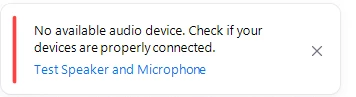
it says my phone is connected....

 

Any suggestions? 



    Best answer by FORE-Craig

    Unfortunately not right now! 😞


    There was talk during the Zoomtopia 2021 event that Zoom is working on a feature to allow us to click on a contact or number (on a webpage for instance) on the desktop and have the desk phone make the call. I haven't heard anything about when this will become available.

    You can see the video here:

    https://zoomtopia.com/ondemand/?video-id=Hy7tiZQa

    1 reply

    FORE-Craig
    Specialist
    Specialist
    December 28, 2021

    Hi! Are you clicking on the a contact in the call history in the Zoom computer desktop app, or on the Cisco desk phone? For the Zoom computer desktop app, you will need both a microphone and speakers properly selected in the Audio Settings for the app (Gear icon). See attachment.


    I hope this helps!

    Craig

    CSWAuthor
    Newcomer
    December 28, 2021

    So my desk phone is not the microphone and speakers? 


    FORE-Craig
    Specialist
    Specialist
    December 28, 2021

    Unfortunately not right now! 😞


    There was talk during the Zoomtopia 2021 event that Zoom is working on a feature to allow us to click on a contact or number (on a webpage for instance) on the desktop and have the desk phone make the call. I haven't heard anything about when this will become available.

    You can see the video here:

    https://zoomtopia.com/ondemand/?video-id=Hy7tiZQa