

BLF (Busy Lamp Field) DTMF Tone Customization | Community
Skip to main content
Partner
September 28, 2022
Question

BLF (Busy Lamp Field) DTMF Tone Customization

  • September 28, 2022
  • 4 replies
  • 3 views

Hello, I would like to set up a BLF on our Yealink phones so users can join or leave a call Queue.  I see a basic list of DTMF tones in the following article; however, I can't find any mention of what the DTMF tone would be to activate this on the phone.


https://support.zoom.us/hc/en-us/articles/360057122592-Using-and-customizing-DTMF-codes#h_01F0XPQWX91HNRRSGXGSGM9SRG


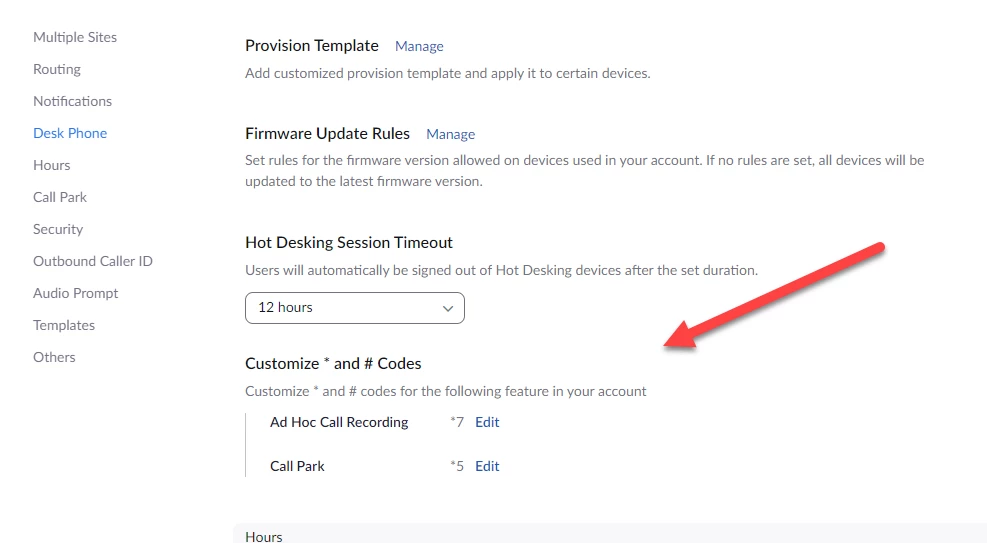
I did follow the part about adding or customizing DTMF tones if you are an admin; however, I can't add to the two. 


    4 replies

    Contributor I
    October 4, 2022

    So you basically are wanting to use a line key to enable agents to log on or off of a call queue? As far as I know, the only ways to do that are for agents to use one of:

    • web portal settings
    • zoom app's Receive Call Queue menu
    • power pack call queue widgets (if one has power pack licenses)

    No way via a desk phone that I know of.....

    gundocAuthor
    Partner
    October 4, 2022

    That is a correct, pretty common setting for other phone systems.   This way, users don't need the portal up or open; everything can be handed over from the phone. 

    Contributor I
    October 4, 2022

    Zoom Phone doesn't have much in the way of DTMF codes to change the behaviour of things.

    See:

    https://support.zoom.us/hc/en-us/articles/360057122592-Using-and-customizing-DTMF-codes

    gundocAuthor
    Partner
    October 4, 2022

    well, that is what I posted in my original question, I found that guide; however, I would need to know what the tones are in order for it to work.     Also, I can't seem to add a new DTMF key to the list of two that I have listed there.

    Contributor I
    October 4, 2022

    Can't do anything other than what is in that list; only thing you can do is make a Feature Request to get that added.