Admin Password for Yealink Phone | Community
Skip to main content
Newcomer
February 28, 2023
Solved

Admin Password for Yealink Phone

  • February 28, 2023
  • 2 replies
  • 67 views

Factory reset on T54W phone and Admin password is not "admin". Has anyone else encountered this?

    Best answer by Eliot

    i set my desk phones admin password globally and my Admin password is not 'admin'. 


    someone may have set the password to something other than admin.

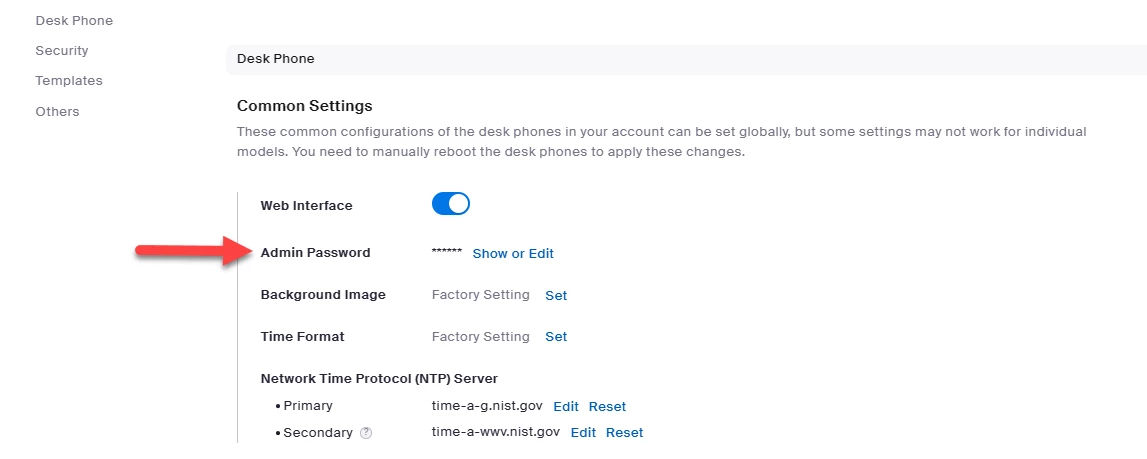
    you can check to see what desk phone global admin password is.

    phone system management>company info>settings>desk phone

    if you are using the desk phone screen to input password, make sure you select appropriate format: 123 for numbers, abc for lower case, and ABC for upper case.


    thanks, eliot

    2 replies

    EliotAnswer
    Community Super Champion | Partner
    February 28, 2023

    i set my desk phones admin password globally and my Admin password is not 'admin'. 


    someone may have set the password to something other than admin.

    you can check to see what desk phone global admin password is.

    phone system management>company info>settings>desk phone

    if you are using the desk phone screen to input password, make sure you select appropriate format: 123 for numbers, abc for lower case, and ABC for upper case.


    thanks, eliot

    Newcomer
    March 1, 2023

    Perfect answer, thanks. I discovered that there was a capitalized letter in the password which didn't make it's way into my notes.