


Zoom was narrating everything | Community
Skip to main content
shrabonidey94
Newcomer
Newcomer
August 2, 2023
Solved

Zoom was narrating everything

  • August 2, 2023
  • 9 replies
  • 81 views


Hello All, I'm seeking support on Zoom technical issue which i faced yesterday during hosting a meeting where I was sharing my screen (sharing videos and audios), accepting participants from waiting room etc. The problem which I faced was that the zoom was narrating everything like when a person is joining the meeting or when person is leaving, when i was making someone co-host, or when I started sharing my screen. Please help me to figure it out because tomorrow again i have to do the same.

Also, let me know if it is a global issue from the main account or was a problem with my zoom account or system(mac).

Thanks!


Best answer by Frank_TB

Hello,


It sounds like you have the Zoom Screen reader turned on.


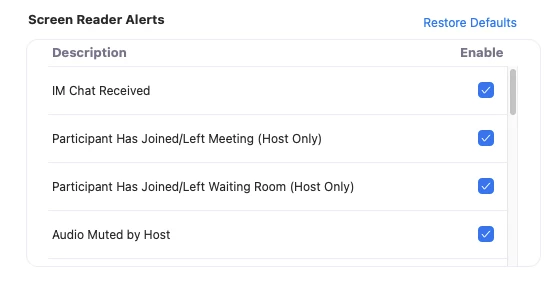
Screen reader alerts allow you to hear custom announcements using your screen reader whenever specific actions are performed in Zoom, such as when the host has muted audio, when closed captioning is available, or when you have received an IM chat message. You can manage which alerts you want the screen reader to announce.


How to enable or disable screen reader alerts


  • Sign in to the Zoom desktop client.
  • Click your profile picture, then click Settings.
    Click the Accessibility tab.
  • Select the check box next to each alert to enable or disable it.


https://support.zoom.us/hc/en-us/articles/360048870451-Using-screen-reader-alerts 


Regards

If my reply helped, don't forget to click the accept as solution button!

9 replies

Frank_TBAnswer
Community Champion | Customer
August 2, 2023

Hello,


It sounds like you have the Zoom Screen reader turned on.


Screen reader alerts allow you to hear custom announcements using your screen reader whenever specific actions are performed in Zoom, such as when the host has muted audio, when closed captioning is available, or when you have received an IM chat message. You can manage which alerts you want the screen reader to announce.


How to enable or disable screen reader alerts


  • Sign in to the Zoom desktop client.
  • Click your profile picture, then click Settings.
    Click the Accessibility tab.
  • Select the check box next to each alert to enable or disable it.


https://support.zoom.us/hc/en-us/articles/360048870451-Using-screen-reader-alerts 


Regards

If my reply helped, don't forget to click the accept as solution button!

shrabonidey94
Newcomer
Newcomer
August 2, 2023

Thank you so much for your help!


Community Champion | Customer
August 2, 2023

Happy to help.

Regards

Newcomer
October 13, 2023

I'm having the same issue. everything is disabled and im still hearing it talk

Newcomer
November 6, 2023

I disabled all the screen reader alerts and it still announcing, I also disabled it in my computer accessibility settings, what should I do? 

Newcomer
December 7, 2023

I disabled all the screen reader alerts and it still announcing, I also disabled it in my computer accessibility settings, just like everyone else.  I uninstalled and reinstalled.  Looks like there's a bug.  Maybe it's not updating our preferences on the backend when the request is made to your API. 

Did anyone else ever find a solution (other than the one that was accepted)?

Newcomer
December 8, 2023

Having same problem tonight as you did a few hours ago. Really hope this gets fixed. 

Newcomer
February 6, 2024

Nothing I do is fixing this. I want this guy to stop announcing everything and interrupting all the time!!! I hate this. If this is a bug, it needs to get fixed ASAP.

Newcomer
February 29, 2024

I have the same problem!!  Everything is disabled and it still does voiceover for everything in Zoom.  How do we make this stop?!?!

Newcomer
December 11, 2024

I am still having this issue, have tried all of the mentioned work arounds and it's becoming incredibly frustrating for not only me but my coworkers. Please fix this or let me know what I can do to remedy this issue. 

Newcomer
January 8, 2025

I am having the same problem.  Can someone please help?


MGSR
Community Manager
Community Manager
January 16, 2025

Welcome to the Zoom Community, @kme167! Kindly check out @CarlaA's answer in this thread

Newcomer
March 21, 2025

Good morning, 

@CarlaA & @MGSR - I can confirm that my Screen Reader settings are all disabled yet the issue is persisting. Zoom actions continue to be narrated over my speakers, same as OP.


Issue is not resolved via proposed solution.