

Zoom UI very slow while camera is in use | Community
Skip to main content
Newcomer
November 16, 2021
Solved

Zoom UI very slow while camera is in use

  • November 16, 2021
  • 7 replies
  • 26 views

Recently my workplace has been running into an issue with Zoom when our webcam is streaming its picture on the screen. Zoom will be slow to respond to any clicks such as muting, minimizing, maximizing windows, moving the window around, etc. The network connection seems normal, talking to people and camera movement seem to work normally. Resource Manager shows around 60%-70% usage of CPU / RAM during a meeting and the SSD has plenty of space available.


What's odd is nothing else seems to run slow during this time, only Zoom. Microsoft Teams does not experience this issue.

I have tried the following:

1. Updating windows to the newest version, reinstalling zoom
2. Rolling back windows updates and graphics drivers to the last known working version
3. Changing the webcam from a Logitech Brio to a Logitech 960
4. Changing the PC to a different PC (we have two boardrooms it's happening to both)
5. Tried both 32 bit and 64 bit installs
6. Ensured Logitech webcam software was up to date and only running at 720p - even on a fresh PC with no software installed it runs the same
7. Lowered the resolution of the TV from 3840x2160 to 1920x1080


None of these changes have made any discernable difference. I am thinking I could try and update the software of the TV but that doesn't make sense as it is only Zoom having this issue.

Anyone else having similar issues?
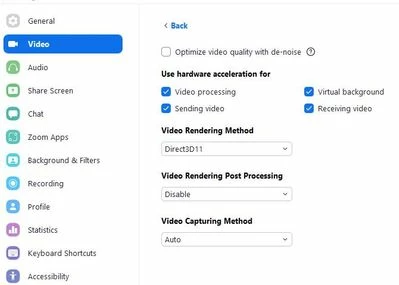
    Best answer by harry2096

    I think i found a possible solution for the slow unresponsive UI. 

    Tried several setting and it seems the slow UI has to do with the [Video Rendering Method


    When i change it from  'auto'  to 'Direct3D'  the UI is responsive as it was. 

    It seems the  'auto' method choose the wrong video rendering method and setting it manually is better. 


    Hope this helps you.


    7 replies

    YaBoiB
    Community Champion | Employee
    Community Champion | Employee
    January 14, 2022

    Hello,
    My name is Brandon. Thanks for joining the Zoom Community! When you say "streaming," are you talking about streaming to Facebook, YouTube, or just streaming your video through the Logi? 


    Question: Do you have your settings set to "Group HD" enabled when launching your meeting client to perform these tests? 


    Can you also send me your upload and download speeds and what type of connection you are connected to (wired, wifi)?


    I am assuming that this is not a Zoom Room setup, but can you confirm that for me, please? 


    You could remove your %appdata% folder (note you will lose all settings and data from the client) and then reinstall the meeting client. If this solves the issue, this would tell me that you may have had some corrupted data in that folder. 


    We may want to issue a support ticket on this issue and allow our team to look into your meeting data further to isolate where this issue may be stemming from. 


    Newcomer
    February 14, 2022

    Exact same problem here, never had this problem before.  UI reacts most of the time after 2-5 seconds.  Very annoying. Sometimes UI reacts normal.  CPU usage is 1%-3%. 

    I deleted all of Zoom as you suggested,  also deleted browser extension. 
    Very PC wih lots of memory, fast GPU .
    Windows 10, latest updates. 
    Zoom 64 bits , 5.9.3. (3169)

    any suggestion?

    Newcomer
    May 15, 2022

    same problem here. Zoom reacts very slowly with a 3-5 seconds delay, this is very annoying. windows 11, HP Zbook with sufficient CPU, RAM etc. Any solutions to this problem?

    harry2096Answer
    Newcomer
    May 15, 2022

    I think i found a possible solution for the slow unresponsive UI. 

    Tried several setting and it seems the slow UI has to do with the [Video Rendering Method


    When i change it from  'auto'  to 'Direct3D'  the UI is responsive as it was. 

    It seems the  'auto' method choose the wrong video rendering method and setting it manually is better. 


    Hope this helps you.


    Newcomer
    May 15, 2022

    thanks a lot, I will try it out tomorrow

    YaBoiB
    Community Champion | Employee
    Community Champion | Employee
    May 15, 2024

    Thank you to @harry2096 for finding the solution to this issue. If anyone is still experiencing this issue and have attempted the solution, please let me know and we can work on an alternate solution. 

    Newcomer
    May 21, 2024

    My zoom is also really slow when I move my mouse or want to do something. I've tried everything. My macbook is old (10.15.7). But I don't have problems with it and I use photoshop etc also. What can I do? I updated everything, make more space available etc. My settings also look different in the picture above. 


    Newcomer
    July 11, 2024

    As of the latest update today,  my Zoom is atrociously slow. It's a if a Zoom bug is hogging up all my RAM or maybe an endless cycle or similar.  Hopefully an fix update soon.