Zoom Meeting | Community
Skip to main content
Newcomer
September 2, 2021
Solved

Zoom Meeting

  • September 2, 2021
  • 3 replies
  • 1 view

Hello, Zoom Community. Polling is for Basic or Upgrade?

    Best answer by Ohkawa

    Hi,hangtuananh123

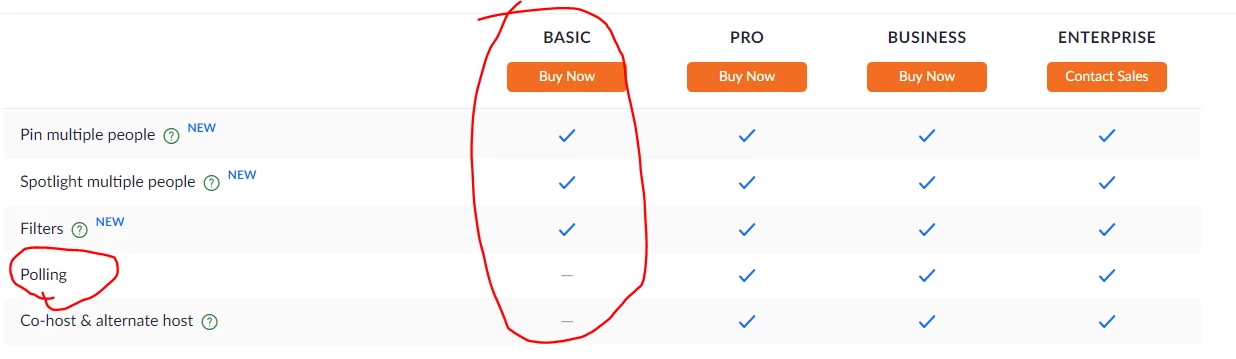
    Basic can not use polling.

    See below

    Zoom Video Conferencing Plans & Pricing | Zoom - Zoom

    If my answer has cleared up your questions, please click on 'Accept as Solution'.


    best regards.

    3 replies

    Ohkawa
    Community Champion | Customer
    OhkawaAnswer
    Community Champion | Customer
    September 2, 2021

    Hi,hangtuananh123

    Basic can not use polling.

    See below

    Zoom Video Conferencing Plans & Pricing | Zoom - Zoom

    If my answer has cleared up your questions, please click on 'Accept as Solution'.


    best regards.

    Newcomer
    September 2, 2021

    Oh, I have to upgrade. But I don't have any money

    Newcomer
    October 8, 2021
    This post has been deleted.

    Can you talk more information?

    Newcomer
    December 21, 2021

    Go to the Zoom Settings page and sign in with your Zoom username.

    At the top, click on the Meeting tab and select the 'In Meeting (Basic)' section from the sidebar.

    Scroll down and toggle the switch adjacent to 'Polling' to the ON position. Polling turned ON for your account.

    You don't need a Zoom account to join a meeting — but you will need one to do just about everything else. If your coworker or classmate has scheduled a meeting, you can join the link or dial in without making an account — as long as you were sent an invitation. You don't need a Zoom account to join a meeting — but you will need one to do just about everything else. If your coworker or classmate has scheduled a meeting, you can join the link or dial in without making an account — as long as you were sent an invitation joined and enjoy.