

Zoom integration is like divorced parents--lack of communication, can someone help me ? | Community
Skip to main content
Newcomer
January 19, 2024
Solved

Zoom integration is like divorced parents--lack of communication, can someone help me ?

  • January 19, 2024
  • 3 replies
  • 1 view

Hello Zoomers, I have been trying to connect Zoom with Hubspot for meetings and such, but I simply cannot figure this out--and its been two weeks. I've read every existing forum related to HubSpot and Zoom. and nothing. My admin told me to just tell her what roles i should have, and we'll be good. 
Well, I tried. It didn't work. So I need a Zoom professional, or a five-star general, heck, even sir Eric Yuan, to tell me what exact roles and permissions I need to have to make this seamless. 


Best answer by Frank_TB

Hello,


As a Zoom admin who has done many integrations I think this support document seems pretty helpful. Have you tried it. Where do you get stuck?


https://knowledge.hubspot.com/integrations/use-hubspots-integration-with-zoom 


Regards

If my reply helped, don't forget to click the accept as solution button!

3 replies

daniiiiAuthor
Newcomer
January 19, 2024

it looks like I have the integration permission, but there is still something missing. please let me know folks!


Frank_TBAnswer
Community Champion | Customer
January 19, 2024

Hello,


As a Zoom admin who has done many integrations I think this support document seems pretty helpful. Have you tried it. Where do you get stuck?


https://knowledge.hubspot.com/integrations/use-hubspots-integration-with-zoom 


Regards

If my reply helped, don't forget to click the accept as solution button!

daniiiiAuthor
Newcomer
January 19, 2024

Okay, this is the work flow for me.

1. I go to Hubspot's App Marketplace,

2.type in Zoom.

3.Click Install App, 

4. Then the problem happens.

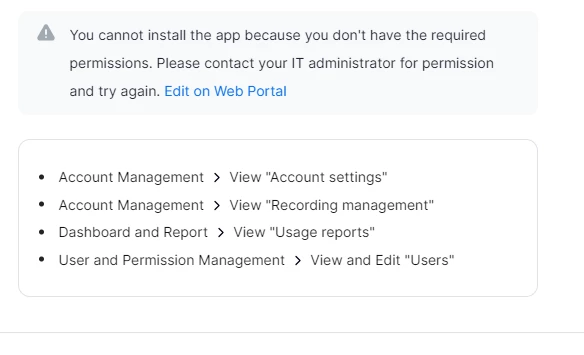
 A Zoom pop up says that I don't have the required permission on Zoom. 

My question is, what permissions do i need to have?


CarlaA
Community Manager
Community Manager
January 26, 2024

Hello @daniiii ! Thank you for coming to the community for your integration inquiry.


@Frank_TB is correct, the article he posted states that:

I will go ahead and mark his reply as the accepted solution. If the article he linked is not helpful, please let us know so that we can better assist you.

Thanks!

Community Champion | Customer
January 20, 2024

Hello,


Did you read the guide I linked to? The answer is in the first paragraph.


Regards

If my reply helped, don't forget to click the accept as solution button!