Zoom Error Message "Cannot Control Mic With AirPods Pro" | Community
Skip to main content
Newcomer
March 12, 2025
Solved

Zoom Error Message "Cannot Control Mic With AirPods Pro"

  • March 12, 2025
  • 3 replies
  • 37 views

About a week ago I can no longer Mute/UnMute with the button on my AirPods Pro.

It has been working perfectly in the past. Now I get a Zoom error message "Cannot control mic with AirPods pro" See picture.

This is a new error It used to work up until about a week ago.

I tried reinstalling Zoom. I tried unpinning and reaping my Bluetooth headset.

Best answer by MGSR

Hello @pauldmooney,

Welcome to the Zoom Community! We're glad to have you here.

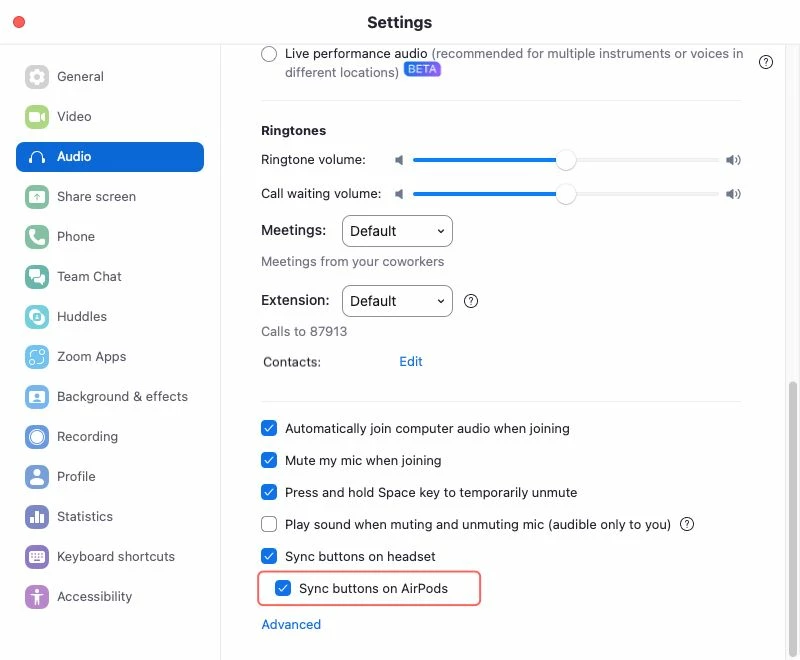
Please update your Zoom app to version 6.4.0 or higher. This will resolve the issue and enable the option to sync the buttons on your AirPod Pros.

3 replies

storyhub
Community Super Champion | Customer
March 13, 2025

Apple hardware is very picky about what will properly work. Try the following including resetting the airpods. https://support.zoom.com/hc/en/article?id=zm_kb&sysparm_article=KB0058146

Newcomer
March 14, 2025

Thanks for the reply. I HardReset the AirPods Pro, I even formatted my Mac and reinstalled the OS and reinstalled Zoom. Must be a resent update to AirPods or Zoom that stopped it from working.

Newcomer
March 17, 2025

I have the same issue since updating to MacOS 15.3.1. Zoom Workplace may have updated in that time as well. Version: 6.3.11 (50104). So I can't say which is the culprit. 

Did the hard reset work?

MGSR
Community Manager
MGSRAnswer
Community Manager
March 25, 2025

Hello @pauldmooney,

Welcome to the Zoom Community! We're glad to have you here.

Please update your Zoom app to version 6.4.0 or higher. This will resolve the issue and enable the option to sync the buttons on your AirPod Pros.

Newcomer
April 7, 2025

I am on MacOS Zoom Version: 6.3.11 (50104) I will check for updates.

Newcomer
May 5, 2025

it used to work fine. Today, clicking on my airpods opened Apple Music, despite the fact that the 'sync airpod button' is on.

Any suggestions?