zoom dimmed | Community
Skip to main content
Newcomer
December 21, 2023
Solved

zoom dimmed

  • December 21, 2023
  • 2 replies
  • 7 views

Hello, in some meetings on my smartphone LG G5 it gets too dark dimmed for no reason. The only solutio i found is to restart the zoom-app


Dim flashing video shared in a meeting or webinar - Zoom Support


how can i disable the dimming of videos shared in a meeting?
Best answer by oill1z

Perfect!


2 replies

YaBoiB
Community Champion | Employee
December 21, 2023

Hello @oill1z 

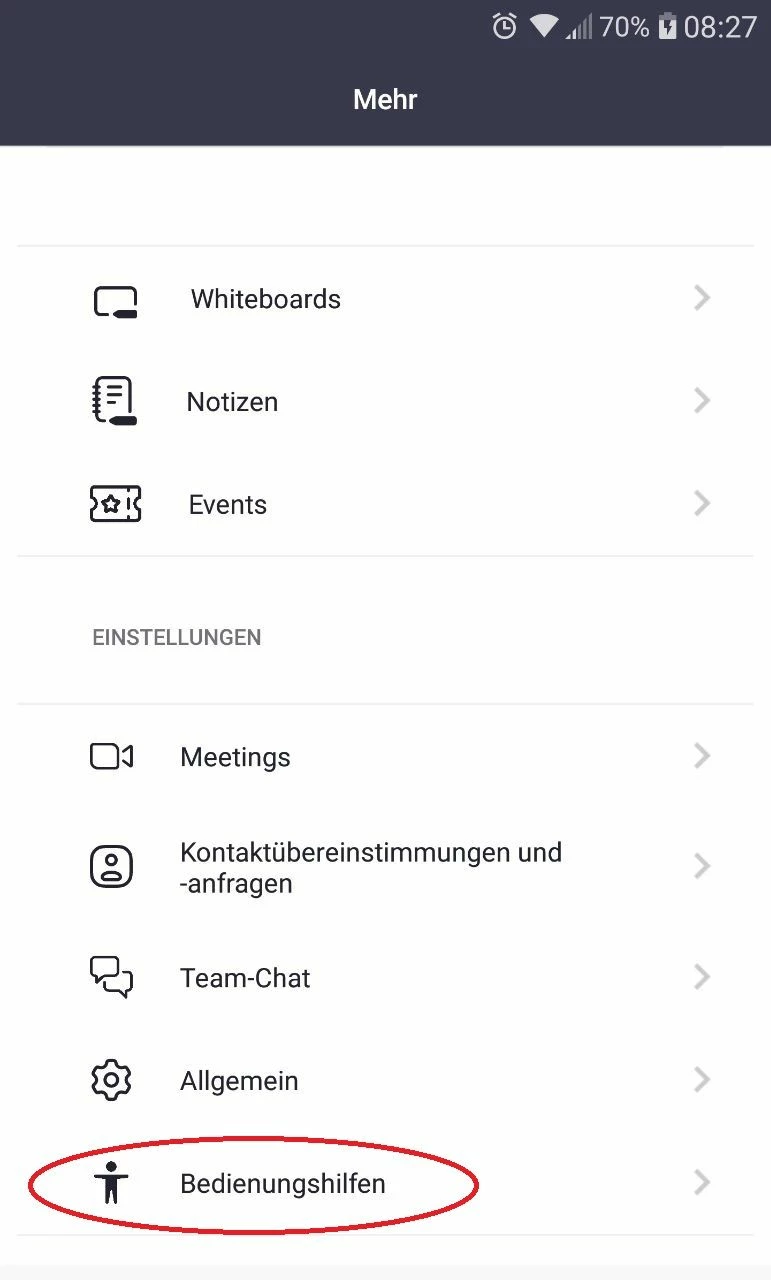
 There should be a setting in your accessibility settings on your mobile device if you have already tried to make this setting change on your Zoom app settings (screenshot below). Not only do apps have accessibility settings, but so do mobile devices or tablets. Attempt to make that setting change and let me know if that helps. 


Since I do not have an Android phone and cannot test this for you. ( I have an iPhone) I took the liberty of looking up some other resources that might help you with this question. 


https://www.techjunkie.com/how-to-stop-lg-g5-from-dimming/


Newcomer
November 19, 2024

I did this on my Android however when I use my computer it still dims the video. That tab is missing on my laptop account.


oill1zAuthor
Newcomer
November 19, 2024

did you install updates and is your zoom up2date? windows 10 or 11? all drivers up2date?

oill1zAuthorAnswer
Newcomer
December 23, 2023

Perfect!