

Zoom crashes when trying to add background image | Community
Skip to main content
Newcomer
December 17, 2021
Solved

Zoom crashes when trying to add background image

  • December 17, 2021
  • 7 replies
  • 497 views

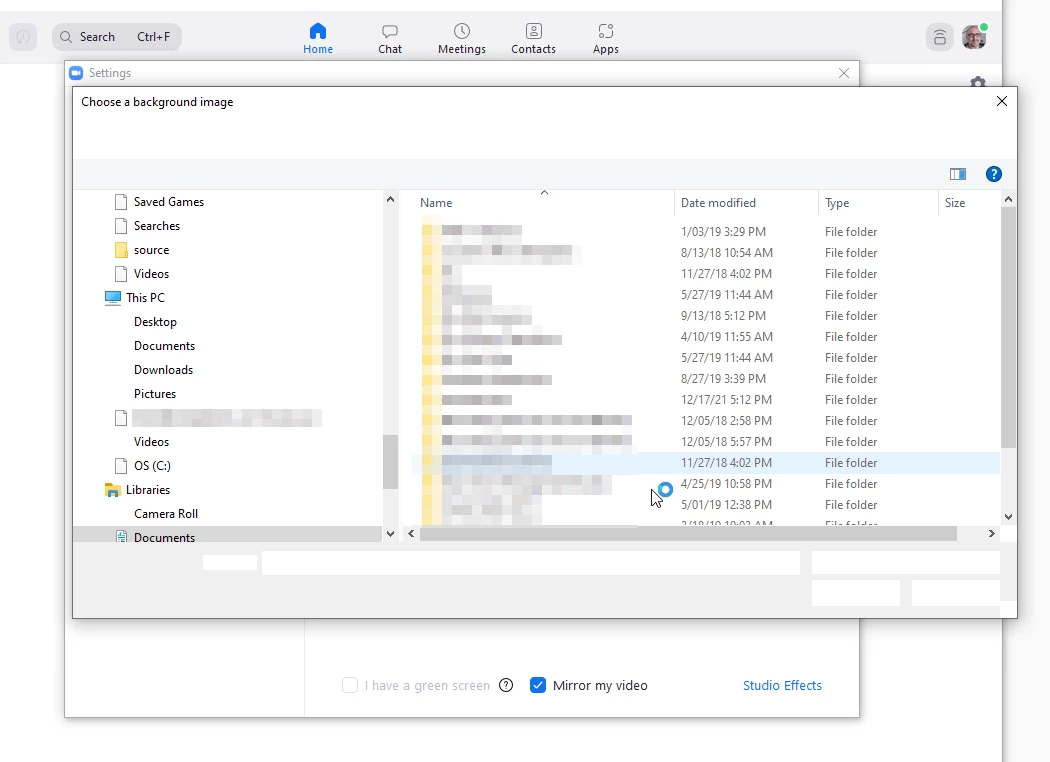
I cannot add/change my virtual background because Zoom crashes when the open file dialog box appears. The cursor will spin for a minute, then zoom will crash. Any troubleshooting ideas would be welcome. I have already uninstalled using the clean uninstaller tool, and then reinstalled. The problem persists and occurs on Zoom only.

This is what it looks like just before crashing. The dialog appears, the cursor changes to the "waiting cursor",  you cannot interact with the screen, then it crashes. It's not intermittent - it's every single time. 
 

**** UPDATE: 2022-01-25 *****

I just updated to Version 5.9.3 (3169) and the issue is resolved.


    Best answer by kwander

    Thank you! Version 5.9.3 (3169) solved the problem for me too!

    7 replies

    Newcomer
    December 21, 2021

    This also happens to me. I uninstalled and reinstalled Zoom, but it didn't resolve the issue. 

    Newcomer
    January 19, 2022

    Same here, I've repeatedly filled out the form asking what I was doing, but had no feedback or anything.

    I'm not a happy about this!!! 🙎

    shane_mAuthor
    Newcomer
    January 25, 2022

    I am the original poster. 

    I just updated to Version 5.9.3 (3169) and I am no longer experiencing the issue.

    kwanderAnswer
    Newcomer
    January 28, 2022

    Thank you! Version 5.9.3 (3169) solved the problem for me too!

    Newcomer
    November 18, 2022

    Same issue with version 5.12.8.

    Newcomer
    November 19, 2022

    It only crashes on my iPad, not my iphone


    Newcomer
    September 11, 2025

    Hi, Since Zoom crashes when opening the background image dialog, here are some steps that may help: Update Graphics Drivers: Ensure your GPU drivers are current, as this can affect image handling. Run as Administrator: This ensures Zoom has full access to system folders. Check Folder Permissions: Make sure your Pictures/Documents folders are accessible. Disable Hardware Acceleration: Go to Settings → Video → Advanced and turn off hardware acceleration. Test on a New User Account: Sometimes profile-specific settings cause issues. These steps usually resolve issues with adding virtual backgrounds. If it continues, Zoom Support can provide guidance using your system logs.

    New Member
    January 29, 2026

    It happened again on version 6.7.2 (26342)

    New Member
    January 29, 2026

    me too