Zoom Client Sound Test Failure | Community
Skip to main content
Newcomer
January 18, 2022
Solved

Zoom Client Sound Test Failure

  • January 18, 2022
  • 2 replies
  • 0 views

Hey all - I'm a long time Zoom host and consider myself competent for the standard end user solutions. 


Issue:  USB wireless Corsair Headphones fails sound test in Zoom client.


Troubleshooting:

  • All other apps recognize Corsair headphones and provide output without issue.
  • Speakers pass output test in zoom client.
  • Same headphones pass sound test in Zoom app on alternate devices.
  • Headphones provide audio output through Chrome browser - zoom meeting.
  • Checked for PC updates
  • Completed uninstall of all zoom download/install files using CleanZoom.zip provided by Zoom.
  • Rebooted PC


    Best answer by Ray_Harwood

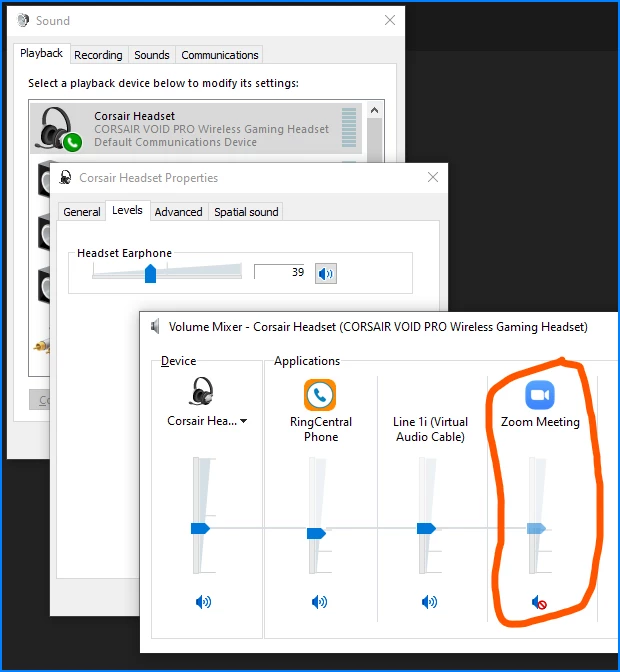
    Check your Corsair's volume in Sound Control Panel / Properties window, or in Volume Mixer:


    Also check settings in iCue, if you have that installed. 


    And also check to be sure you don't have Zoom muted in your Corsair Headset.  I have done this way too many times myself -- watching a long meeting, muting the audio, leaving the meeting, and forgetting to unmute the Zoom audio.


    Hope that helps...

    2 replies

    Ray_Harwood
    Community Super Champion | Customer
    Community Super Champion | Customer
    January 19, 2022

    Check your Corsair's volume in Sound Control Panel / Properties window, or in Volume Mixer:


    Also check settings in iCue, if you have that installed. 


    And also check to be sure you don't have Zoom muted in your Corsair Headset.  I have done this way too many times myself -- watching a long meeting, muting the audio, leaving the meeting, and forgetting to unmute the Zoom audio.


    Hope that helps...

    howdypalAuthor
    Newcomer
    January 19, 2022

    Thank you so much!!!!! This was an instant solution! I had seen the zoom client in the volume mixer, but not the "meeting controls" which had to be scrolled for, lol!