Zoomダッシュボードの場所 | Community
Skip to main content
Newcomer
February 6, 2024
Solved

Zoomダッシュボードの場所

  • February 6, 2024
  • 2 replies
  • 2 views

Zoom ダッシュボードから、特定のお客さんとの通話時間を確認したいと思います。 ところが、ダッシュボードが見つかりません。

どこにあるか教えていただけませんでしょうか?

    Best answer by Bort

    こんにちは @望月仁 


    アカウント管理者は、Zoom Web ポータル内の左側の [管理] セクションの上部にあるダッシュボードにアクセスできます。
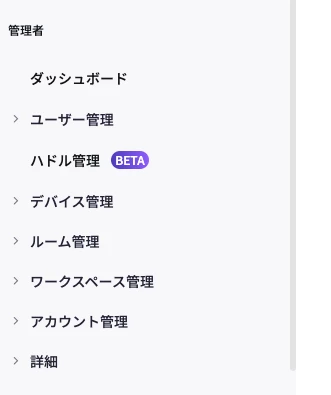
    このオプションが表示されない場合は、アカウントの管理者ではないか、アカウントにダッシュボードへのアクセス権がないことを意味している可能性があります (ビジネス アカウント以上)。


    ダッシュボードにアクセスできない場合は、レポート セクションを確認することもできます。ここでは、各参加者の曲の参加や退席など、各会議に関する詳細が表示されます。


    お役に立てば幸いです。さらにご質問がございましたらお知らせください。 それ以外の場合、この情報が必要なものであれば、必ずソリューションを承認済みとしてマークしてください。

    <in English>

    Account admins can access the Dashboard from within the Zoom web portal, at the top of the left side Admin section.

    If you do not see this option, it may mean that you are not an admin on the account or your account does not have access to the Dashboard (Business accounts and higher)


    If you don't have access to Dashboard, you can also check the reporting section, which will still give you some details about each meeting, such as join and leave tunes for each participant.


    Hope that helps and let me know if you have any further questions. Otherwise, make sure to mark the solution as accepted if this information is what you needed.



    2 replies

    Bort
    Employee
    BortAnswer
    Employee
    February 6, 2024

    こんにちは @望月仁 


    アカウント管理者は、Zoom Web ポータル内の左側の [管理] セクションの上部にあるダッシュボードにアクセスできます。

    このオプションが表示されない場合は、アカウントの管理者ではないか、アカウントにダッシュボードへのアクセス権がないことを意味している可能性があります (ビジネス アカウント以上)。


    ダッシュボードにアクセスできない場合は、レポート セクションを確認することもできます。ここでは、各参加者の曲の参加や退席など、各会議に関する詳細が表示されます。


    お役に立てば幸いです。さらにご質問がございましたらお知らせください。 それ以外の場合、この情報が必要なものであれば、必ずソリューションを承認済みとしてマークしてください。

    <in English>

    Account admins can access the Dashboard from within the Zoom web portal, at the top of the left side Admin section.

    If you do not see this option, it may mean that you are not an admin on the account or your account does not have access to the Dashboard (Business accounts and higher)


    If you don't have access to Dashboard, you can also check the reporting section, which will still give you some details about each meeting, such as join and leave tunes for each participant.


    Hope that helps and let me know if you have any further questions. Otherwise, make sure to mark the solution as accepted if this information is what you needed.


    Community Champion | Employee
    February 7, 2024

    望月様


    ご利用されているプランはプロプランでしょうか。

    ビジネスプラン以上はダッシュボードのご利用が可能ですので、ぜひ一度ご確認ください。

    ビジネスプラン以上の場合、確認方法はBortさんから示した場所からご確認いただけます。


    Jing