Where is 'Remember my name' information stored? | Community
Skip to main content
Newcomer
June 10, 2022
Solved

Where is 'Remember my name' information stored?

  • June 10, 2022
  • 1 reply
  • 3 views

We are in a VDI environment and I'm struggling to location where Zoom is storing information when a user checks the box to Remember my name for future meetings.   Does anyone know where this information is being stored?  Our users have to re-enter this every time.

    Best answer by Ray_Harwood

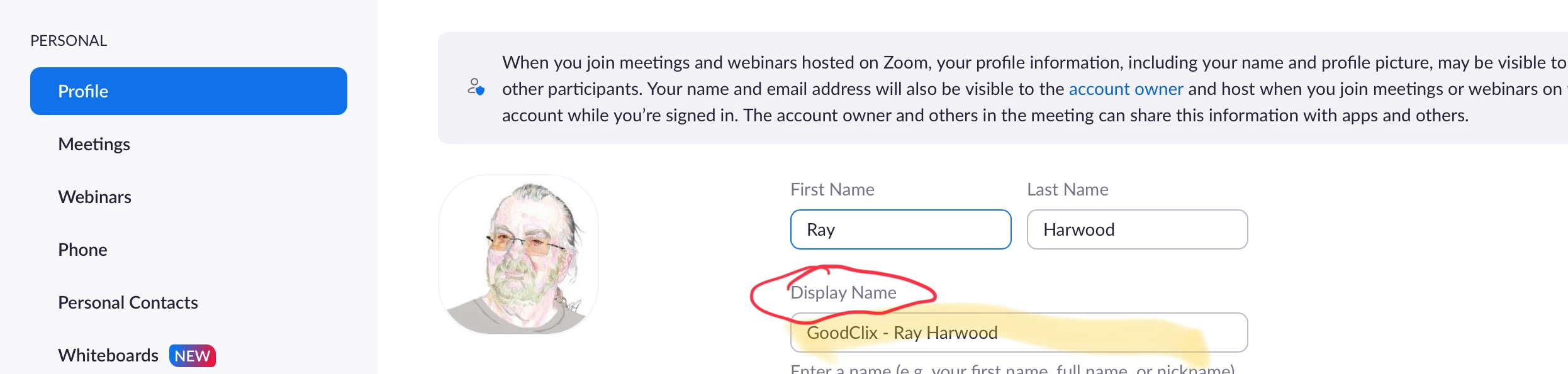
    To make a permanent change to the display name, log onto the Zoom.us .web page for your account. Notice the text in small font on your Profile tab, circled below in the middle of the screen:

    Click the Edit button on the right side to make a “permanent” change by editing the Display Name which is highlighted yellow here:

    It’s “permanent” until you come back here and change it. If you change it anywhere else in Zoom, it’s only for that session – as you’ve discovered.  


    1 reply

    Ray_Harwood
    Community Super Champion | Customer
    Community Super Champion | Customer
    June 11, 2022

    To make a permanent change to the display name, log onto the Zoom.us .web page for your account. Notice the text in small font on your Profile tab, circled below in the middle of the screen:

    Click the Edit button on the right side to make a “permanent” change by editing the Display Name which is highlighted yellow here:

    It’s “permanent” until you come back here and change it. If you change it anywhere else in Zoom, it’s only for that session – as you’ve discovered.  


    TrinityRAuthor
    Newcomer
    June 12, 2022

    I will test this out on Monday.  My Display name was already populated from our SSO, but it appears that extra save when editing the profile causes it to be 'permanent'.  Good insight!  I was losing my mind thinking the client was storing this somewhere on the desktop.  I'll accept as solution once I test it with a few users.  Thanks