Explorer
September 30, 2025
Solved

WHERE DID THEY MOVE SCHEDULE MEETINGS????

I just logged into try and schedule some meetings and the whole interface has been changed.  I go to click on meetings and it gives me the option to "host" or "join" a meeting....  Sigh.....  Where the heck did they move the dashboard when you used to log into your account and it launched right then and there.  Now it's filled with all sorts of garbage promoting more services to buy that don't interest me and clutter up my screen.


And, where do you request support to chat with a support agent?  I'm not interested in their stupid AI bots.


I don't understand why they have to make things harder.
Don.zAnswer
Community Manager
October 15, 2026

Great news! 👋

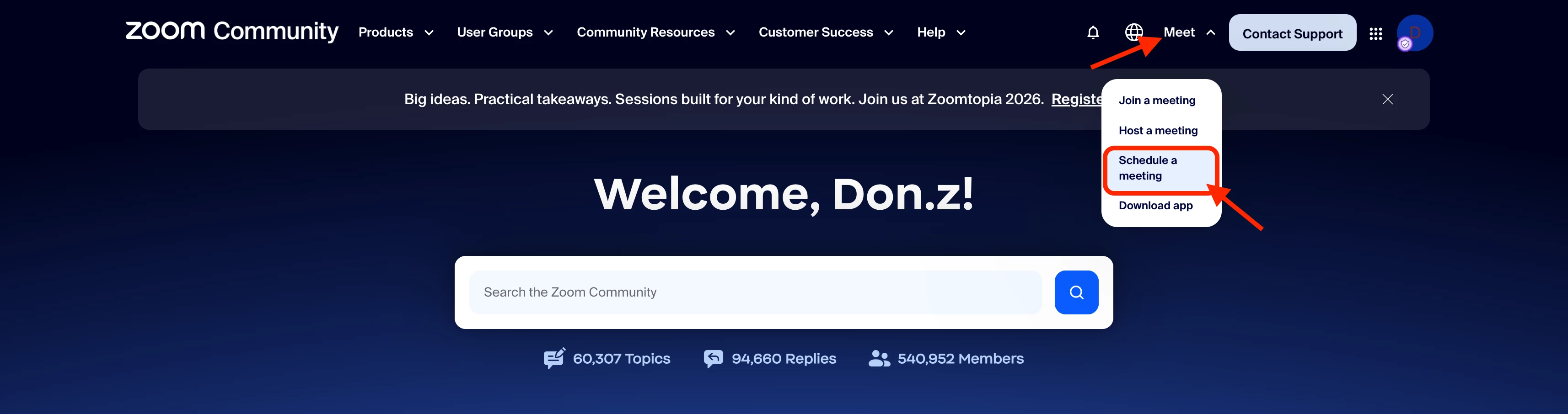
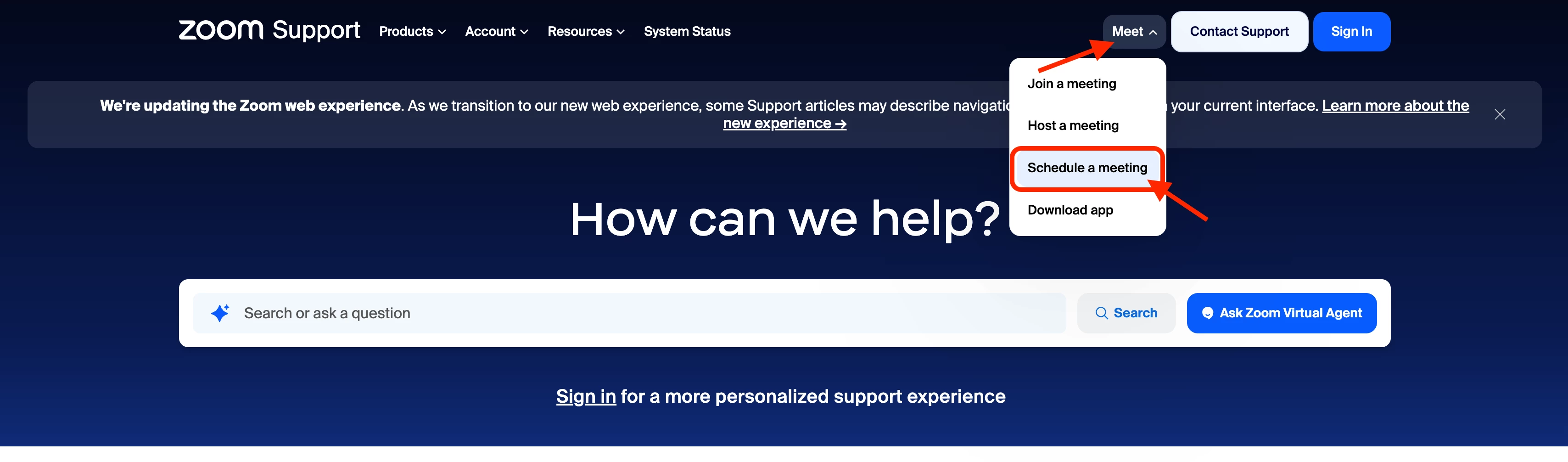
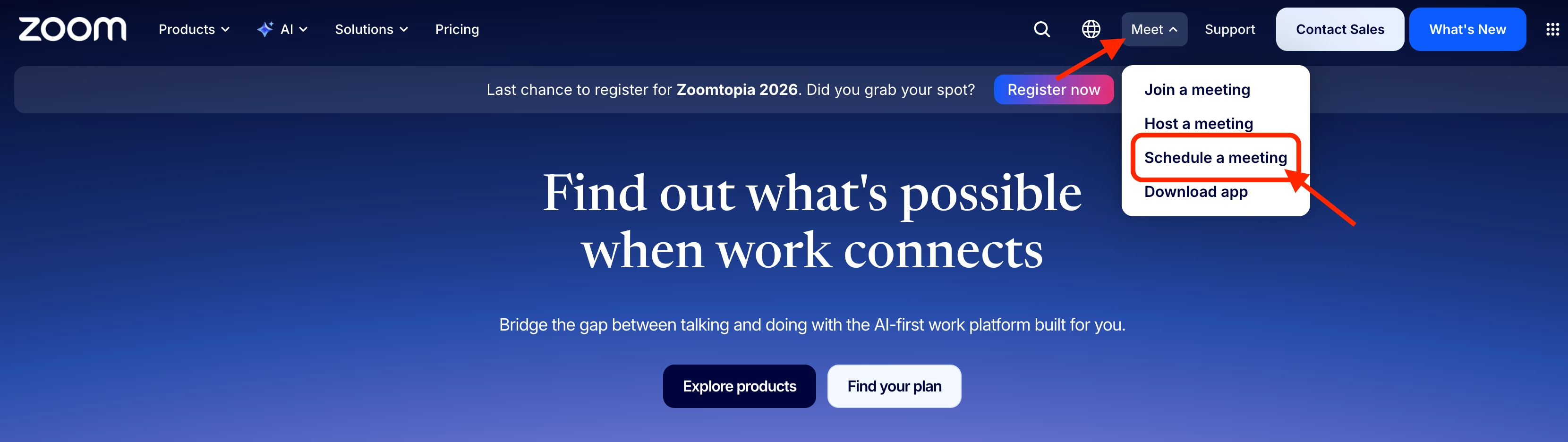
Following the feedback many of you have shared about how difficult it was to find the Schedule a meeting option, the updated Meet dropdown is now available across Zoom.com, Zoom Community, and the Zoom Support Center, making it easier to find the meeting options you need.

When you select Meet, you'll find Join a meeting, Host a meeting, Schedule a meeting, and Download app directly in the dropdown.

You can find the updated navigation on all three sites:

Zoom.com

Screenshot 2026-10-16 at 4.09.14 AM.png

Zoom Community

Screenshot 2026-10-16 at 4.59.39 AM.png

Zoom Support Center

Screenshot 2026-10-16 at 4.34.25 AM.png

If you'd prefer to go directly to the scheduler, you can access it here: Schedule a meeting. If you use it frequently, we recommend bookmarking the link in your browser for quick and easy access.

Looking for meetings you've already scheduled? You can view your upcoming and previous meetings in the Zoom web portal.

We appreciate everyone who took the time to share feedback in this thread. Thank you for your patience and for helping us improve the Zoom experience. We hope this update makes finding the scheduling option a little easier!

Regards,
Zoom Community Team

90 replies

New Member
October 1, 2026

Zoom web interface changed this morning. If you are looking to schedule a meeting on your Zoom web page, click the waffle icon next to your pic on the upper right, then click "Meetings". You will then see your existing meetings and the "Schedule a Meeting" button on the upper right.


Why could Zoom not broadcast these instructions widely? Provide a diagram? Zoom: DO BETTER!

Translate
Newcomer
October 2, 2026

Funny I just asked the same question with almost the same words! It’s annoying to have everything move somewhere non-intuitive! Thank you for asking for this.

Translate
New Member
October 2, 2026

I have always appreciated the user-friendliness of Zoom, since the days when it arose against established platforms like Go To Meeting and Webex and was much more streamlined, easy, and fast. We found that we could request features, and they would happen. Zoom has always seemed much easier to use and more recently it has been my preferred platform vs. Teams, even though most of my clients use Teams these days since it is pushed by their monopoly platform. However, recently Zoom has been challenging to use because of the cluttered interface pushing numerous AI features I don’t need or want. Yesterday I sat down to run a webinar on my employer’s account and found the brand new GUI, which is much less intuitive and we had to waste time figuring it out when we could have been working on set up. A colleague shared a story of an attendee of a meeting or webinar being able to produce an AI meeting summary and sending it out to every other participant, cluttering up people’s inboxes. Then, we were not able to find the usual setting restricting sharing to one person at a time. There are now multiple tabs holding different shared items. At one time, our in-person room (a panelist) saw one screen while a remote webinar participant complained they couldn’t see the screen we saw in the room. We had to bring down the shared slides and reshare - very awkward. I am trying to find those webinar SETTINGS right now to track down if I have a way out of this happening in the future and can’t find them anywhere! Because you completely redesigned the GUI in a way that makes no sense whatsoever. And you pushed it out so fast that you don’t even have the info on your website up in an easily accessible way to guide us.  We have better things to do in our lives than waste time taking a training course to learn how to use an app we always used just fine. Zoom, you are not a social media company - you used to be very user-oriented. Now you seem to be manipulatively pushing shareholder profit stuff - all about AI all of the time. Please go back to being user-first, which you did very well.

Translate
New Member
October 3, 2026

I log into my paid Zoom account and all I can find is sales messages selling me other zoom products. I can’t find what I've paid for  - it's an overwhelming number of sales messages and I can’t find my own scheduled webinars anywhere! 

Translate
Explorer
October 4, 2026

what are options outside of Zoom?  Zoom is no longer something I want to work with...anyone have suggestions?


Translate
Newcomer
October 5, 2026

I ran into this exact confusion after the update too. I spent a good ten minutes clicking around before I found the Schedule button tucked into the new layout, so I totally get the frustration.


What finally stuck for me: in the desktop app I pinned the Scheduler to my Home tab, so now the Schedule button is right there when I open Zoom. And when I'm setting up a bunch of meetings at once, I just use the web portal instead, since that layout still feels closest to the old one.


Took me a few days to stop hunting for it, but honestly it's one less click than before once it clicks.

Translate
Community Manager
October 7, 2026

Hello, Community members!

We appreciate all of the feedback shared here - thank you! We have coordinated directly with the Product team to work on improvements. As a first step, on zoom.com, you will now see "Schedule a Meeting" added to the primary "Meet" button in the top right menu.

This change will also be added to our support and community sites in the near future. We’ll keep you posted here when we have an update to share.

Thanks for your patience!

Translate
Don.zAnswer
Community Manager
October 15, 2026

Great news! 👋

Following the feedback many of you have shared about how difficult it was to find the Schedule a meeting option, the updated Meet dropdown is now available across Zoom.com, Zoom Community, and the Zoom Support Center, making it easier to find the meeting options you need.

When you select Meet, you'll find Join a meeting, Host a meeting, Schedule a meeting, and Download app directly in the dropdown.

You can find the updated navigation on all three sites:

Zoom.com

Screenshot 2026-10-16 at 4.09.14 AM.png

Zoom Community

Screenshot 2026-10-16 at 4.59.39 AM.png

Zoom Support Center

Screenshot 2026-10-16 at 4.34.25 AM.png

If you'd prefer to go directly to the scheduler, you can access it here: Schedule a meeting. If you use it frequently, we recommend bookmarking the link in your browser for quick and easy access.

Looking for meetings you've already scheduled? You can view your upcoming and previous meetings in the Zoom web portal.

We appreciate everyone who took the time to share feedback in this thread. Thank you for your patience and for helping us improve the Zoom experience. We hope this update makes finding the scheduling option a little easier!

Regards,
Zoom Community Team

Translate
Newcomer
October 7, 2026

To be clear - if you get the screen filled with zoom things you don’t want or need, go to Settings under your account, top right corner to find the page you need to get to your meetings.

Translate
Newcomer
October 7, 2026

I almost live in Zoom for several grant projects and with students. This new interface launched with NO warning, and I looked like an idiot trying to share my screen, trying to record, and losing people's faces where I used to be able to pop them out and see people and present at the same time. Going on a few days here with the new interface and I cannot figure this out -- I am not a stupid person, but this is not intuitive. To make that worse, I usually record content in advance for folks to watch so we can discuss without a 'review' of content. I record brief videos of different content topics in the same meeting and I used to be able to hyperlink to each recording. Now-- the interface tells me there were two recordings in that one meeting, but I cannot get separate information for either, and I can't rename them. SO FRUSTRATING. I almost think I need to switch completely to what my university prefers, which is Teams. I actually think I can navigate Teams still, now that Zoom is non-functional for my needs. I hope the Zoom folks are reading these comments. Seriously, for years, we preferred Zoom to Teams, and now I think the least-worst option is Teams. Goodbye Zoom! You used to work well....

Translate
Explorer
October 7, 2026

I have clients asking how they can do things, where meetings are, and I can’t help them. This is a clown show. I can’t find how to add an alt host to an existing meetings, I have meetings showing up on my google calendar (I’m the host, I own the calendar event) that are not showing up in Meetings, I miss the web profile interface where I could FIND all this, and now apps.zoom.us is kind of like the app but not really, and NEITHER has the useful functionality. I should not have to look three places to find a meeting and edit it, What HAPPENED? Nothing was fixed but so much seemed to break.

Translate