Where did my cloud recording go? | Community
Skip to main content
Newcomer
April 18, 2022
Question

Where did my cloud recording go?

  • April 18, 2022
  • 5 replies
  • 1105 views

I just hosted a meeting and recorded it to Zoom Cloud.  At the end of the meeting I clicked leave meeting like everyone else and that was it.  I thought that was where/when I would name etc my recording.  But my recording is nowhere to be found.   What did I do wrong and can I find it ?

    5 replies

    Community Champion | Employee
    April 18, 2022

    Hello! @HNrp 


    Check out this link to see where the video's should be stored: https://support.zoom.us/hc/en-us/articles/206277393


    If you recorded locally, be sure to follow the guide on converting your local recordings with the desktop client.


    Hope that helps and please make sure to mark the solution as accepted if this information is what you needed.

    Newcomer
    April 18, 2022

    If you are certain that you recorded your meeting through the cloud, you should locate your cloud recording here: https://zoom.us/recording

    Recordings started by co-hosts will only appear in the host's list of recordings in the Zoom web portal, this means that the cloud recording will always go to the original host's cloud recording tab.

    HNrpAuthor
    Newcomer
    April 18, 2022

    Yes, I was certain I recorded the meeting to the cloud and not locally.  It's been a few months since I was a host and recording, after asking here I got an email from Zoom saying my recording was ready and where it could be found.  I panicked too soon but thanks for your help.  

    Newcomer
    April 18, 2022

    Great! If my previous response helped solved your concern kindly consider clicking the 'Accept as Solution', thanks 😄 

    Newcomer
    April 23, 2022

    Hi, I just wanted to check in and see if my response has been of help to you. If so, it will be greatly appreciated if you can click the 'Accept as Solution' button.

    This will be a great help to the community and to people who are having the same concern and are looking for answers.

    Newcomer
    March 2, 2026

    Althought the comment above is from 3 years ago, I just had the same thing happen. I conducted a lengthy meeting on Saturday, February 28. During breaks in the meeting, I turned off recording. The meeting was divided into three sections, all being recorded to the cloud. I can access Sessions 1 and 2, but Session 3 is nowhere to be found. As the person above, I clicked Leave Meeting along with everyone else. I have checked my account as late as 2 hours ago, and there are still only 2 recordings. Please advise.

    New Member
    March 23, 2026

    I need my cloud recording that just finished. Where can I find it?

    ExpertswhoJohn
    Community Super Champion | Customer
    Community Super Champion | Customer
    March 24, 2026

    hi ​@Mark Ashworth ,

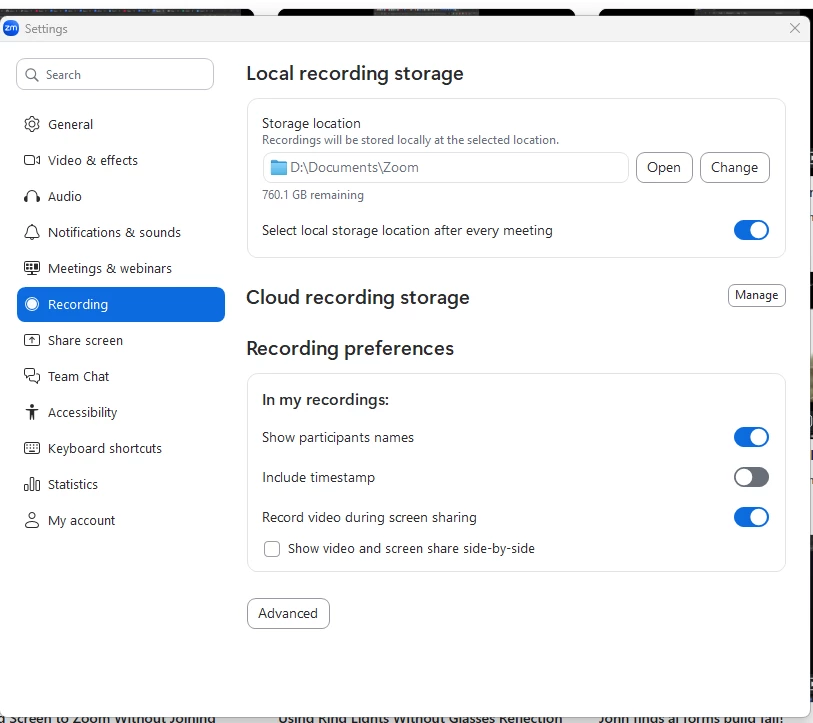
    If you look in your settings there is a section for recordings.

    Please like and mark as the solution if this helps

    All the best


    John Drinkwater

    Zoom Community Super Champion.

    Zoom Developer Champion

    Community Champions are not paid to provide this support and have no access to customer settings or data. I am not personally an employee of Zoom