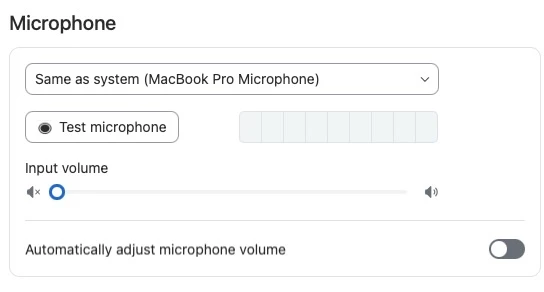
What happens when mic input is manually muted in Settings > Audio > Microphone, then unmuted in the meeting interface?
I know that in Zoom Settings, mic input can be set to mute when joining meetings.
In Zoom Settings, there is also a setting: Audio > Microphone where the Input volume can either be set to be 'Automatically adjust(ed)…', or not automatically adjusted, and manually set to any level from 0 to maximum.
Being able to set the mic input level manually makes sense in certain circumstances, but when it is set to 0 (muted), during a meeting, I can unmute the mic input in the meeting interface, and I am heard in the meeting.
What is happening technically when I have the mic input set to 0 in settings, and unmute the mic in the interface? My hunch is the mic level is changed to automatic level control automatically; if it is passing audio, it is no longer set to 0 (mute). On the flip side, if the mic input level is *manually* set to something greater than 0, but muted in the interface, I suspect that when the mic is unmuted in the interface, it adopts the manually set level; it is clear it is no longer muted, as enabled in Settings.
To repeat/summarize, what is happening when the mic level is set to 0 (mute) in Settings, but then is unmuted in the interface. What is actually happening?
Related: I would be very useful to have a "Mute" button, or better yet, just turn the icon of a speaker with a x next to it (== mute) into a button, which automatically lowers the input level to 0.
I don't think it matters, but I'm using macOS 14.