What happened to my RECORD button at the bottom of the zoom window? | Community
Skip to main content
Explorer
November 30, 2023
Question

What happened to my RECORD button at the bottom of the zoom window?

  • November 30, 2023
  • 4 replies
  • 148 views

I record often and since just this week, my RECORD button is no longer where it used to be. It used to be between SUMMARY and REACTIONS in the lower bar in the zoom meeting window. I've looked for ways to add it back, but have had no luck. Any help? 

4 replies

Newcomer
December 2, 2023

I have a Mac and Janet changed a thing. All of the sudden this morning I have no record button. I had to make someone else the host to get them to record. I’ve been doing this for 4 years. What happened?

Newcomer
December 2, 2023

I meant I haven’t changed anything! Someone mentioned it’s under settings but there is no settings while in a meeting. There used to be a record and stop recording button. 

nomad70Author
Explorer
December 7, 2023

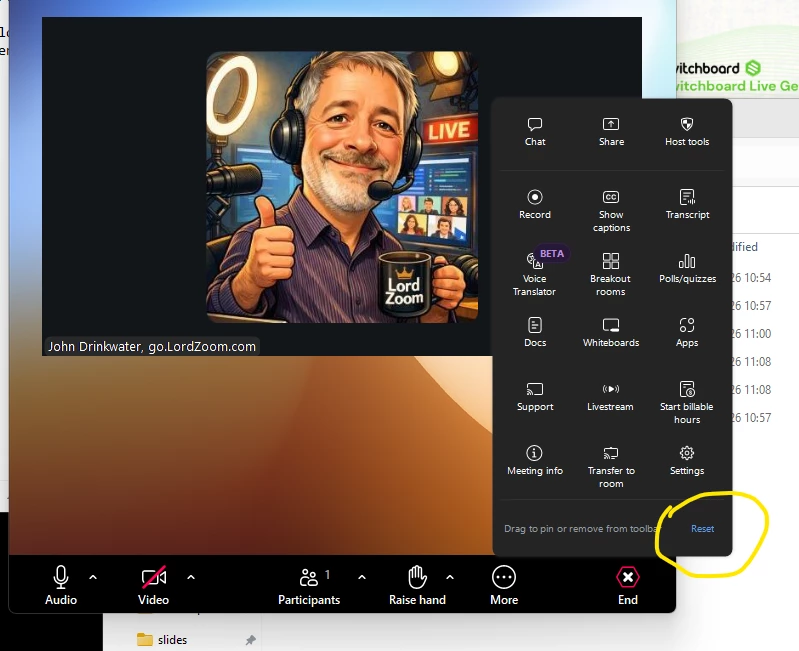
You can still record. Click on the "More" button on the bottom right with the 3 dots. You will see record there. But where is the option to add it at the bottom where it always has been. Is there anyone who can answer this?


Newcomer
December 14, 2024

It's NOT in my 'more' It has completely disappeared.

Newcomer
April 28, 2025

Same here. It is not in my "More" list.

New Member
May 8, 2026

Same here.  Several months ago the record button left my screen and appeared in More.  As of tonight, it’s gone altogether.

Thjs is a real pain.

ExpertswhoJohn
Community Super Champion | Customer
May 8, 2026

Hi ​@Paul Weiss ,


The Boom Buttons can be moved around so you get the ones you need. You can drag then onto the toolbar or change their order. If you want them to go back to the default settings there is a reset option in the list of buttons. Bottom - right


Hope that helps


All the best


John