Hi everyone!
Please kindly check the email address that is signed in to the Zoom scheduler extension in Chrome?
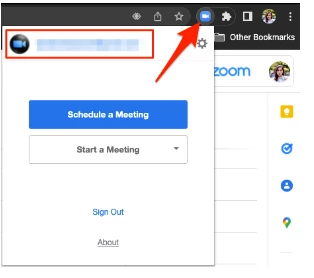
Please also be aware if there are other Zoom profiles that are logged in to your browser. This issue typically arises when there's another profile logged in to the web portal and it was not properly signed out. When a user clicks a meeting link, the system will recognize the profile that is logged in instead of the profile of the host.
Related article: Using the Zoom Scheduler extension for Chrome
Additionally, please try to reinstall the Zoom desktop client and kindly update me if it worked.
For Mac:
Uninstall Zoom version 4.4.53932.0709 and higher
- Open the Zoom desktop application.
- Select zoom.us at the top of your screen and select Uninstall Zoom.
- Select OK to confirm uninstalling the Zoom desktop application and all of its components.
- Once completed, reinstall Zoom on our download center.
Uninstall Zoom version 4.4.53909.0617 and below
- Open Finder.
- Select Go at the top of your screen.
- Select Go to Folder...
- Once opened, input ~/.zoomus/
- Move ZoomOpener to your trash.
- Once completed, repeat steps 3 through 5 for the following folders and files:
- Folder: /Applications/ Move to Trash: zoom.us.app
- Folder: ~/Applications/ Move to Trash: zoom.us.app
- Folder: /System/Library/Extensions/ Move to Trash: ZoomAudioDevice.kext
- Folder: ~/Library/Application\ Support/ Move to Trash: zoom.us
Note: Zoom may not be installed in both the /Applications and ~/Applications folders.
- Once completed, download Zoom from our download center and reinstall.
For more information, please refer to this article: https://support.zoom.us/hc/en-us/articles/201362983-Uninstalling-and-reinstalling-the-Zoom-application
If after following these troubleshooting steps you continue to encounter this issue, let me know!
I hope this helps!
Carla
Zoom Community Team


