virtual backgrounds | Community
Skip to main content
Newcomer
May 1, 2022
Solved

virtual backgrounds

  • May 1, 2022
  • 3 replies
  • 6 views

With the two google accounts I have (different email addresses, both google mail) a different availability of virtual backgrounds. On one account I have all the regular backgrounds plus some I added, while on the other I only have 2 or three.  I am a paying member and am wondering why this is? Thank you for the feedback.
    Best answer by JepZoomie

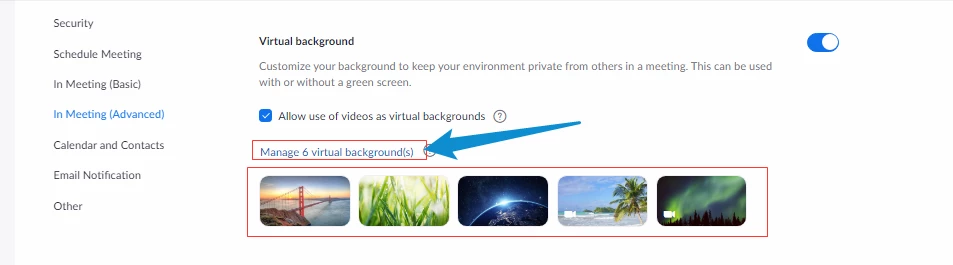
    You might want to check the virtual backgrounds that have been allowed or enabled on your account. Kindly access the Zoom web client (zoom.us) and go to Settings > In Meeting (Advanced) > Virtual Background.

    You may also click 'Manage Virtual Backgrounds'.

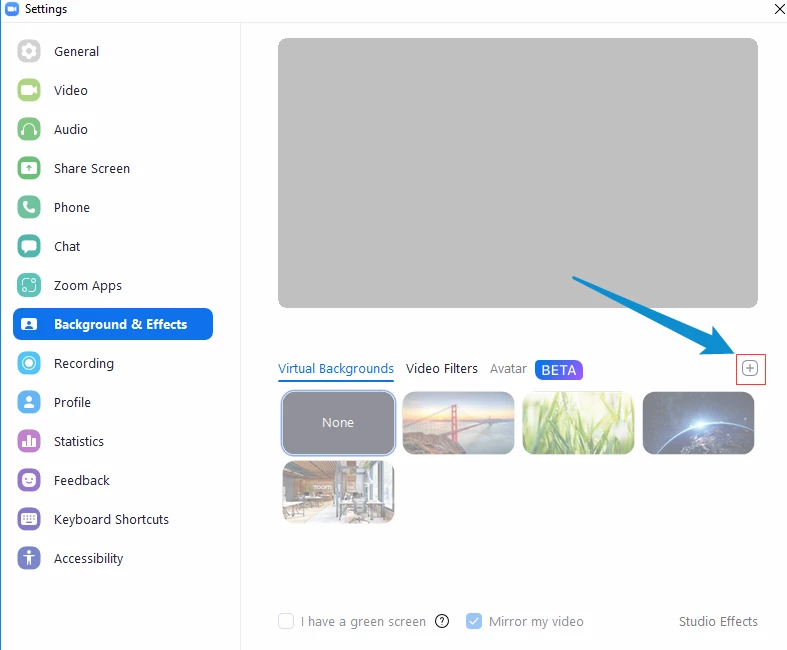
    But if you want to add virtual backgrounds to your Zoom desktop application, that is also possible. Kindly open your Zoom desktop application and go to Settings > Background & Effects > and to Add click the '+' icon at the right part of the tab.


    3 replies

    JepZoomieAnswer
    Employee
    May 1, 2022

    You might want to check the virtual backgrounds that have been allowed or enabled on your account. Kindly access the Zoom web client (zoom.us) and go to Settings > In Meeting (Advanced) > Virtual Background.

    You may also click 'Manage Virtual Backgrounds'.

    But if you want to add virtual backgrounds to your Zoom desktop application, that is also possible. Kindly open your Zoom desktop application and go to Settings > Background & Effects > and to Add click the '+' icon at the right part of the tab.


    Employee
    May 12, 2022

    Hi, I just wanted to check in and see if my response has been of help to you. If so, it will be greatly appreciated if you can click the 'Accept as Solution' button.

    This will be a great help to the community and to people who are having the same concern and are looking for answers.

    Newcomer
    July 11, 2023

    I have a similar issue. Could you help me? I tried to follow your instructions. but can not access the manage as you specified. How do I get there? 

    Here is a bit more info:

    I have just added a new account today under another email address. 

    I also have been a longtime account holder  with another email address.


    I want to have the same access to virtual backgrounds on the new account as I have on the old one.  How do I make that so?


    I have just sing up  and paid $149 a year and thought I would have this same choice of backgrounds. 

    Attached below is a screen shot of the background I would like access to, along with others. 

    The info about a background I would like to access is as follows:  sa_pixar_virtualbg_brave_16x9_41b1e6e3

    I will try and add a photo below

    Newcomer
    July 11, 2023

    Ps... I do not have the option to manage virtual backgrounds on the acct in question as per your instructions above. thanks