

Video freezing since recent update | Community
Skip to main content
Newcomer
August 19, 2021
Solved

Video freezing since recent update

  • August 19, 2021
  • 17 replies
  • 129 views

Hello, I recently updated and since then the participants video keeps freezing. Everything else is exactly the same as before the update so not an issue with internet, computer or camera. It only stops freezing if I share my screen. I’ve tried unloading and reloading but it didn’t make any difference. Can anybody help? I can’t work with it like this. Many thanks in advance, Sarah

    Best answer by ZoomVA

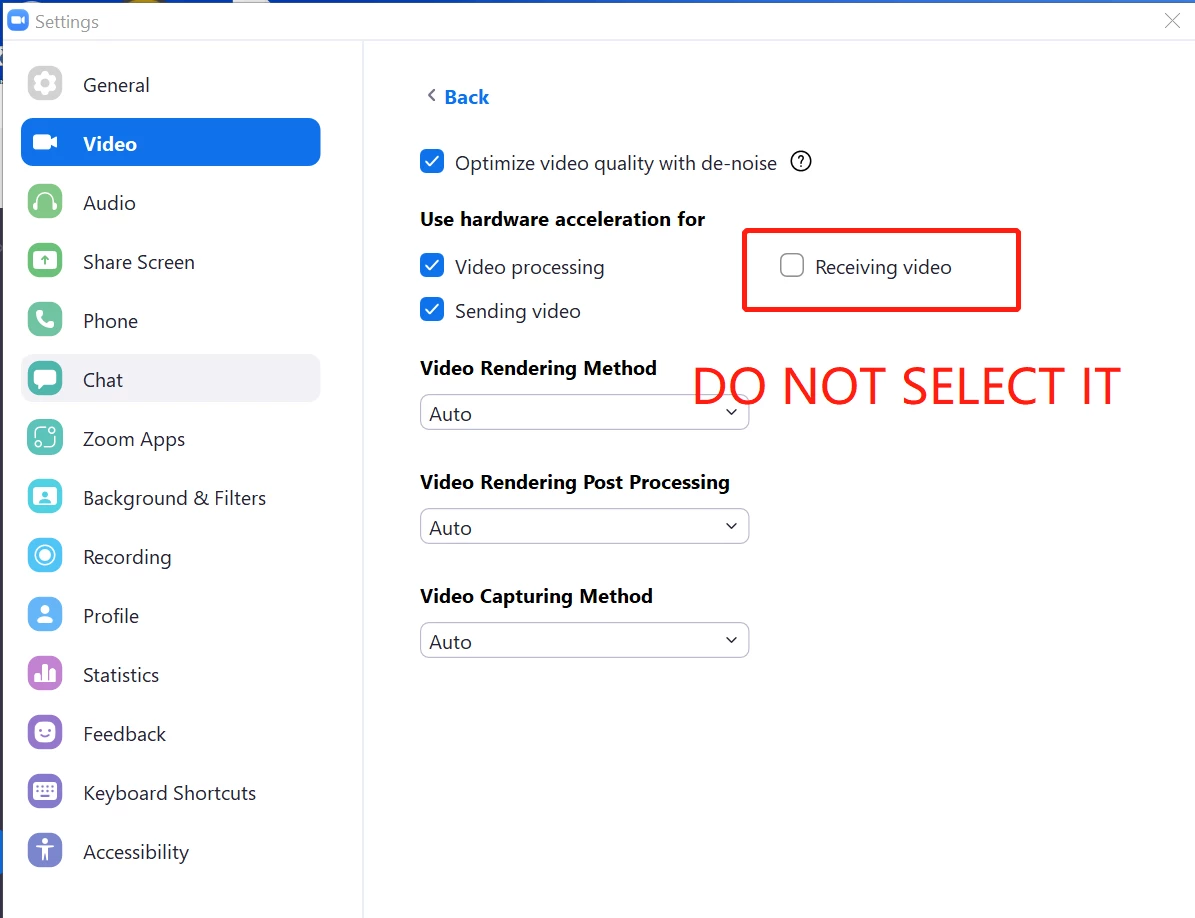
    Hi @SSH  Please try adjusting the video settings in Zoom Client -> Settings -> Video -> Advanced -> Uncheck Receiving Video in the section (Use hardware acceleration for), and see if this solves the issue. 

    17 replies

    Newcomer
    January 17, 2023

    The solution that worked for me was to upgrade to MacOS 12 (Monterey), and using KeyNote v 12.2.1  I have (touch wood) had no further freezing.  I'm currently using Zoom version 5.12.9 

    Hope this helps, at least for Mac users....


    Newcomer
    February 24, 2023

    So this issue is obviously a Zoom issue. Zoom can deny it all they want, but the facts remain. It started with a September update and has continued to now, 5 months later. Users who had no issues with their video suddenly started getting screen freezes, color shifting, static bands with other participants faces streaming above the band like a reader board, etc. It has steadily gotten worse over the last 5 months instead of better. We now have at least 4 participants experiencing this out of our group of around 60. Some have parts in the meeting and their video can't be on because of this. I kept telling people, "hopefully it will be fixed in the next update." But here it is 5 months later and it's still not fixed. I see there is 1 solution here that may work for some Windows users but is not working for everybody. It is unacceptable that Zoom has not fixed this yet. It's not our responsibility to search the internet for a solution to a problem that Zoom created. If a moderator sees this post, please pass it on to the Zoom technicians that create these problems.

    I see that 1 person in this thread has abandoned Zoom for another videoconference provider. Good for him! We should all leave Zoom if they don't take care of their customers and make their user experience trouble free. I would leave Zoom myself if I could. But our group is part of a world wide organization that has chosen Zoom as their platform of choice. And it worked quite well until the September update.   

    Zoom, please fix this.

    Newcomer
    July 11, 2023

    Having the same issues. My Zoom set up has worked great since Lockdown until 2 weeks ago. I am a fitness instructor and use Zoom to teach classes from home. However this is now impossible to do as my video keeps freezing and movement is jerky. I have had to abandon all Zoom classes now and am losing money. I can't see any way to resolve it. I have had a new wifi router and also tried connecting my laptop to it with an ethernet cable but nothing has worked. At a complete loss now about what to do. The videos I see of my clients are fine, its just mine. The audio is good they just can't see me😥. Really frustrated. Please sort it out Zoom

    Newcomer
    July 11, 2023

    It seems that the recent update is causing the participants' video to freeze. Since everything else remains unchanged, such as the internet, computer, and camera, it's likely not the source of the problem. Interestingly, the freezing stops when you share your screen. Unloading and reloading didn't resolve the issue. If anyone can provide assistance, it would be greatly appreciated as you're unable to work in this condition.

    Newcomer
    April 30, 2025

    This is happening to me as well, brand new PC build, 5070/9800x3D, it’s not the internet, application is barely using any of my CPU/memory to run. I’ve tried everything I can find including changing Nvidia settings and unchecking hardware acceleration as mentioned. Everything is up to date including Windows 11, bios, and drivers, I’ve uninstalled and reinstalled several times. It’s only participant videos that freeze and stutter for me, my video/audio does not for them. Is there any fix for this? I use zoom for work and I’m about to switch to a different client all together for meetings.

    Newcomer
    August 31, 2025

    Mine did the same thing. Related to an MS update, not zoom.  My webcam was 11 years old, 

    Probably 110 computer years. Bought a new one for $40, ALL SOLVED....

    Trying to save money in a material world... sigh.

    Newcomer
    August 31, 2025

    Get a new webcam.

    Same issue of freezing image.  My camera was 11 years old... New one ($40) is working fine... sigh