

Video and Sound not synchronised on Windows 11 | Community
Skip to main content
Newcomer
May 10, 2022
Solved

Video and Sound not synchronised on Windows 11

  • May 10, 2022
  • 1 reply
  • 6 views

I recently got a new laptop running Windows 11 rather than Windows 10 on my old laptop. Now I am getting complaints from others that, for the first time, my sound is slightly behind my video on Zoom Meetings. 

My guess is that it's probably a Windows 11 setting but there are so many to choose from. Has anyone had a similar problem and, if so, how do I fix this?

(I tried getting a separate microphone but that made no difference so the mic is being returned tomorrow.) I am on a fast broadband connection so I don't think that's the issue either and all my drivers (mic, and camera) are the latest available (as is my version of Zoom).
    Best answer by AndrewB_S

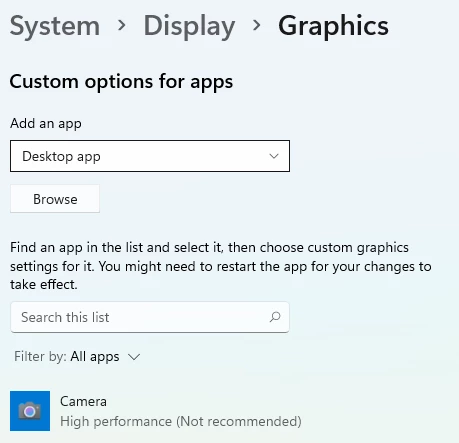
    The drivers were not the source of the problem. In the end I found the relevant setting to change was the Graphics, which you can either find from the Settings screen or you can select >Settings > Display >Graphics and then change the Camera setting from "Let Windows decide (Power saving)" to "High performance (Not recommended)". This worked and I have had no further issues.  I have included a snip from the settings screen below:


    1 reply

    Employee
    May 11, 2022

    Hi AndrewB_S

    You could try to check the device sound driver's Open Settings app and go to System. Under System, go to Troubleshoot > Other troubleshooters. Click on Run next to Playing Audio troubleshooter.


    Also, check for updates for your OS and update the BIOS.


    Can you please try these steps?

    AndrewB_SAuthorAnswer
    Newcomer
    June 17, 2022

    The drivers were not the source of the problem. In the end I found the relevant setting to change was the Graphics, which you can either find from the Settings screen or you can select >Settings > Display >Graphics and then change the Camera setting from "Let Windows decide (Power saving)" to "High performance (Not recommended)". This worked and I have had no further issues.  I have included a snip from the settings screen below:


    Newcomer
    November 1, 2022

    I have the same problem.  :(( Does this work to you? I am wondering if I change the graphics preference, there will be another problem.