

Upside Down Video | Community
Skip to main content
Newcomer
September 17, 2021
Solved

Upside Down Video

  • September 17, 2021
  • 4 replies
  • 126 views

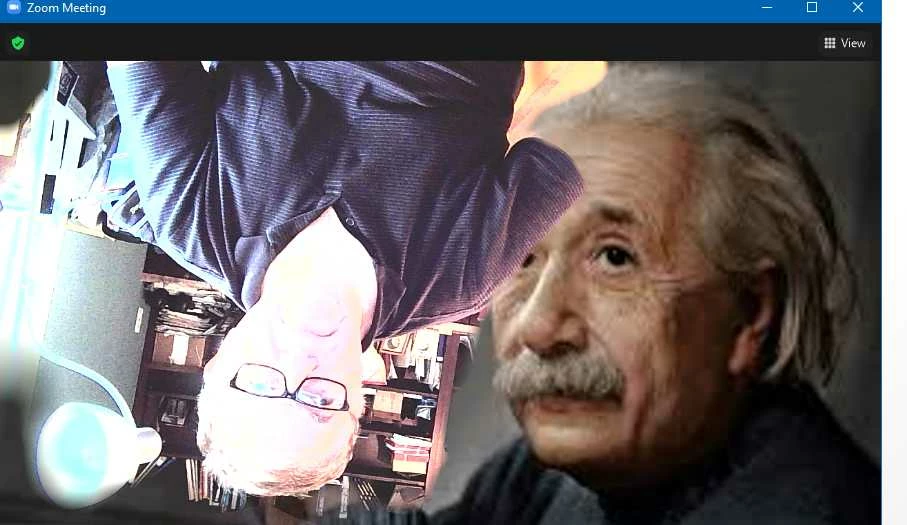
My Zoom video shows me upside down.  The background image is correct but not the "front" of the background. 

Which displays an upside down image.  See screenshot below.

And Yes, I have checked the camera.  It works fine.  It is definitely is Zoom.

Done a search on this community site and found nothing.

There is nothing wrong with the camera.  As it works in all other applications, but not in Zoom.


I can temporarily remedy this by turning off the video - and just show a still of me.  But I host tons of Zoom meetings and it would be great to solve this!


THANKS!


    Best answer by richardIMS

    Rupert!

    THANK YOU

    That took care of it!!


    4 replies

    Rupert
    Community Champion | Customer
    Community Champion | Customer
    September 17, 2021

    Hi @richardIMS ,


    Go to your Video Settings in Zoom and look at your video preview. In the trop right of the picture you will see a small rotate icon.  Try clicking this to rotate your video.


    Hope this helps.


    Rupert


    richardIMSAuthorAnswer
    Newcomer
    September 17, 2021

    Rupert!

    THANK YOU

    That took care of it!!


    Newcomer
    August 30, 2022

    Hi! I'm having the same problem as you were with your upside down image. My camera is fine and is upright everywhere else except for Zoom. Were you able to find a solution?


    Bort
    Employee
    Employee
    August 30, 2022

    Hi @julsully68 

    This article should show you how to rotate the camera in video settings: https://support.zoom.us/hc/en-us/articles/115005859366-Manually-rotating-video

    Newcomer
    March 10, 2023

    I too am having this problem but neither of these two solutions display "Video Settings" or a camera icon under settings. Perhaps it's different now?

    Newcomer
    July 30, 2024

    I'm having the same problem. None of the solutions work for me. I do zoom on a MacBook Air. Has anyone found an answer with this device?

    Newcomer
    July 30, 2024

    The camera is built-in to the MAC.