

Updating time range | Community
Skip to main content
Explorer
September 1, 2024
Solved

Updating time range
  • September 1, 2024
  • 12 replies
  • 51 views

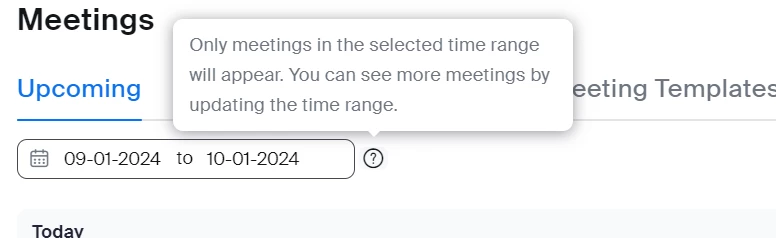
It says only meetings in the selected time range will appear. You can see more meetings by updating the time range.
I can find absolutely no way of updating this. And I can see no tuition on how to do it.
Can somebody tell me how to do this?
I found it much easier when we could just see all of our booked-in meetings.
I don't know why this has changed.
If you can help me that would be great and many thanks.

Best answer by lotusmoon

I have found it.
Click on the calendar emblem.
It will pull up 2 months click on a date in the first month and then click on the same date in the 2nd month.
For example 4th of October to 4th of November.
It will pull up the meetings between those 2 dates.
It would really help if zoom actually answered questions.

12 replies

Newcomer
October 16, 2025

I'm seeing these comments from months ago. Why am I coming on in October 2025 with the same issue? I only see two weeks before my meeting. Matter of fact, I can't even see the meeting I've scheduled in Nov. I don't understand. I came from Calendly. Should I go back?  Not efficient or professional.

Newcomer
October 20, 2025

This has to be one of the most useless, pointless features I've ever seen, and that's a high bar, why can I only see 90 days out on zoom for meetings? if they must have this feature why can't they make it easy to adjust it, and to any timescale. Another UX fail.

MGSR
Community Manager
Community Manager
October 23, 2025

Welcome to the Zoom Community @AndyC2! We highly recommend submitting it as feedback so it can be reviewed by the relevant department for possible inclusion in future updates. You can check out this link on how to send feedback to Zoom.