

Unable to use virtual backgrounds using Browser | Community
Skip to main content
Newcomer
August 19, 2024
Solved

Unable to use virtual backgrounds using Browser

  • August 19, 2024
  • 1 reply
  • 4 views

Hi. I have an organization with several Zoom users. 


All of us are able to join video calls in the browser (using the built-in web version, not the SDK).


All of us are able to use virtual backgrounds except one person. 


This person keeps getting the following error:
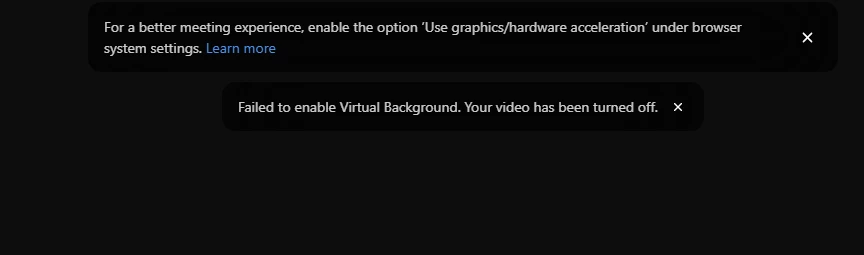
 

They are using the most recent version of Chrome. Why is this issue happening? 

Best answer by MGSR

It's possible that his unit is the only one that this setting is not turned on, or a difference with the updated drivers, and difference in hardware. The requirement for virtual background on the web browser are: 

  • Chrome OS or a Chrome / Edge browser
  • Processor with at least 4 logical cores (includes 4 real cores or 2 cores with 4 threads)

You may read more in this article

1 reply

MGSR
Community Manager
Community Manager
August 19, 2024

Hello @aupreti,

This enhancement ensures users are aware of potential performance issues related to graphic acceleration settings. You can check out this article on enabling graphics or hardware acceleration.

Let me know if you need further assistance.

aupretiAuthor
Newcomer
August 19, 2024

Will they be able to use virtual backgrounds once this option is enabled? 

Also why are they the only user in my organization who is having this issue?

MGSR
Community Manager
MGSRAnswer
Community Manager
August 19, 2024

It's possible that his unit is the only one that this setting is not turned on, or a difference with the updated drivers, and difference in hardware. The requirement for virtual background on the web browser are: 

  • Chrome OS or a Chrome / Edge browser
  • Processor with at least 4 logical cores (includes 4 real cores or 2 cores with 4 threads)

You may read more in this article