Unable to upload a small profile photo - rejected as too large | Community
Skip to main content
Newcomer
September 14, 2022
Solved

Unable to upload a small profile photo - rejected as too large

  • September 14, 2022
  • 1 reply
  • 3 views

I would like a profile photo to appear on the screen when the video is off, as I see others being able to do.  My understanding is that this photo is from the profile photo, but when I try and upload a 47k jpg file, I get a rejection message stating that it is block by a security policy, even though the file is a small fraction of the 2 M max size.


How do I fix this?


Thank you!

    Best answer by ZoomTestKitchen

    In your post you state that the rejection message says that your upload has been blocked by a security policy. If that in fact the message you are receiving I'm thinking there is something other than file size that is the issue at hand. You might try uploading a different image file that is less than 2M, just to see if that image works or produces the same message.

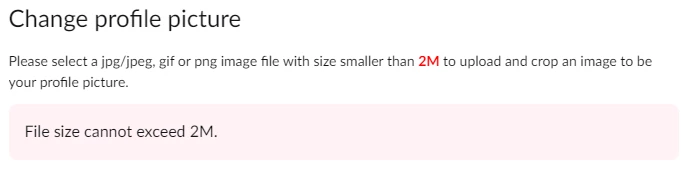
    I've attached the message that you should be seeing if the file you uploaded is too large.

    If this information has been helpful, please click on "Accept as Solution".

    1 reply

    ZoomTestKitchen
    Specialist
    Specialist
    September 14, 2022

    In your post you state that the rejection message says that your upload has been blocked by a security policy. If that in fact the message you are receiving I'm thinking there is something other than file size that is the issue at hand. You might try uploading a different image file that is less than 2M, just to see if that image works or produces the same message.

    I've attached the message that you should be seeing if the file you uploaded is too large.

    If this information has been helpful, please click on "Accept as Solution".