

Transferring Zoom recordings from Zoom to Dropbox | Community
Skip to main content
Newcomer
October 25, 2024
Solved

Transferring Zoom recordings from Zoom to Dropbox

  • October 25, 2024
  • 3 replies
  • 3 views

I'm looking for a way to automate sending Zoom recordings from Zoom to Dropbox. The recordings in question are password protected but no password is required for anyone within our domain. Both the Zoom account and Dropbox account share the same domain credentials.

We used to have a Zapier zap set up but it no longer works and they cannot assist.


What alternatives to Zapier are there for this function? I tried to follow the steps in this discussion but they did not work for me.

Best answer by Ray_Harwood

Welcome to the Zoom Community, @alyson.


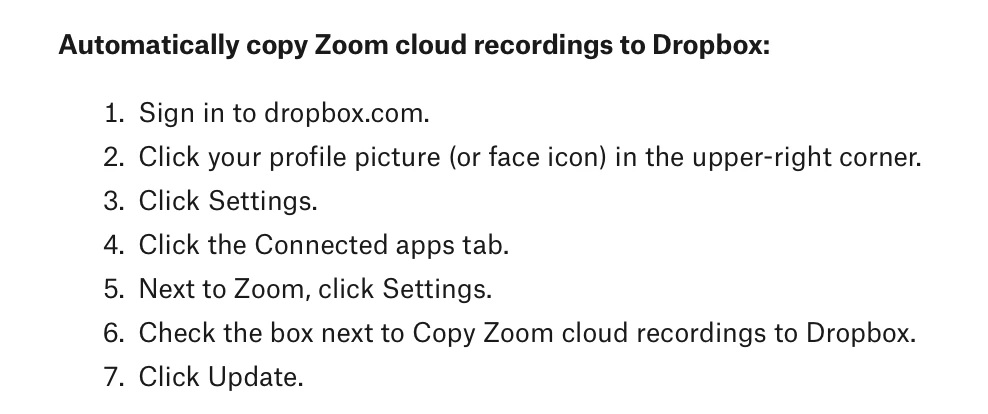
This is enabled in Dropbox, not in Zoom. I’ve been using this for years, and it works very well most of the time, and emails you if there’s an issue. 

See the specific section here: https://www.dropbox.com/apps/zoom 


Screen shot as of 10/27/2024:


3 replies

Ray_Harwood
Community Super Champion | Customer
October 28, 2024

Welcome to the Zoom Community, @alyson.


This is enabled in Dropbox, not in Zoom. I’ve been using this for years, and it works very well most of the time, and emails you if there’s an issue. 

See the specific section here: https://www.dropbox.com/apps/zoom 


Screen shot as of 10/27/2024:


CarlaA
Community Manager
Community Manager
November 4, 2024

Hi @alyson! I just wanted to let you know that I’ve marked @Ray_Harwood 's response as the accepted solution as I believe it answers your question. I hope it helps! If you have any more questions or need further clarification, feel free to ask.

Newcomer
November 21, 2024

I was finally able to get this to work, but with one issue: The destination location in Dropbox needs to be changed. It's currently going to my personal Dropbox location, even when I create the meeting and start the meeting and recording from our admin account. How can I update this?

Newcomer
November 21, 2024

Hi Carla,


While I was able to get the recordings to transfer automatically from Zoom to Dropbox, they are landing in the incorrect location; I created the meeting in our admin@ account (not my personal company Zoom), started it and recorded it in our admin@ account, but the meeting recordings are being transferred to my alyson@ Dropbox folder. How do I update that destination location?


Thanks!

Ray_Harwood
Community Super Champion | Customer
November 21, 2024

@Aly111 / @alyson :


Disable the Zoom access to your Dropbox account. Log out of the Dropbox account that you do not want to receive the files. Log into the account where you do want to receive the files. Repeat the activation process you just performed.


The activation is tied to the account you’re logged into when the activation is completed. 

Newcomer
November 21, 2024

💡Ah, thank you!!