
This is the 2nd error I get when I try to install Zoom on Windows 10. | Community
Skip to main content
Explorer
April 25, 2026
Question

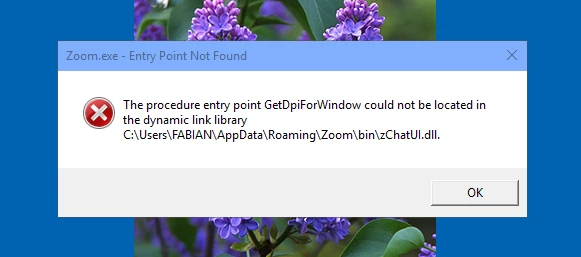
This is the 2nd error I get when I try to install Zoom on Windows 10.

  • April 25, 2026
  • 11 replies
  • 104 views

I cannot tell if Zoom has installed or not.


    11 replies

    storyhub
    Community Super Champion | Customer
    Community Super Champion | Customer
    April 26, 2026

    It appears that windows can not find the zChatUI.dll file. This can be from numerous reasons. Some of which includes not installing as a windows admin, interference from anti-virus software, bad sectors on the hard drive, missing distribution files, etc. Try uninstalling Zoom per https://support.zoom.com/hc/en/article?id=zm_kb&sysparm_article=KB0065146

    fp3229Author
    Explorer
    April 26, 2026

    I don’t think so.

    A similar error I got after Zoom 6.4.12. Zoom told me it had something to do with Microsoft software. That was not the case and I had to wait for a Zoom update for them to fix it.

    Later versions worked until now when the same thing happen. I got the same answer: update pack for Microsoft software version 2008.

    Don’t believe it. They screwed up again and give the runaround. Typical.


    storyhub
    Community Super Champion | Customer
    Community Super Champion | Customer
    April 26, 2026

    I have 3 older HP laptops running Win 10, 3 mini PCs running Win 10, a mini PC running Win 11, and a desktop running Win 11. None of these computers have any issue with any version of Zoom. The error you show is typical of issues with the Windows OS and not with Zoom. A little online research will explain how to resolve these issues with Windows.

    fp3229Author
    Explorer
    April 26, 2026

    If this is a problem with an old version of Windows, how to explain the following:

    • Zoom worked fine until 6.4.12 after which it would not install.
    • A couple of versions later it installed again
    • Now in 7.0.2 it issues two errors but installs and seem to be working OKit again? What is more, 7.0.2 seems to have installed

    If the problem is windows, shouldn’t it have had the same problem with everything after 6.4.12?


    storyhub
    Community Super Champion | Customer
    Community Super Champion | Customer
    April 27, 2026

    Your cause and effect logic is not correct. For your logic to be true Zoom would have to fail on multiple devices for the same version, which it did and does not do. Your failure is due to parts of the Windows OS being corrupted or too old, which different versions utilize different components of Windows. As previously noted a little online research will explain how to resolve these issues with Windows.

    fp3229Author
    Explorer
    April 27, 2026

    FYI I searched and found the Visual C solution that is recommended. But I want to know if it will install on my Windows 10 1511 first -- does anybody know what are the requirements for it?

    I have no problem going back to older zoom if  the update pack 1 won’t install on 1511.


    Lilly Rowling
    Newcomer
    Newcomer
    April 27, 2026

    Try fully uninstalling Zoom first, then restart your PC and install the latest version again from Zoom’s official Download Center. Older Windows 10 installs often won’t update properly and just keep showing new errors until the old version is removed—Zoom support and other users report that uninstall + fresh reinstall usually fixes it. Also run the installer as Administrator and temporarily check that antivirus or low disk space isn’t blocking the setup.

    It worked for me multiple times.

    fp3229Author
    Explorer
    April 27, 2026

    Absolutely not!

    I made sure I had nothing to do with MS updates since 1511. While everybody was dealing with MS crap I was always up and running--never any problems. 

    I have all the software that I need that works with it and do not need new software that does not bring me anything I need except spying, and useless GUI and AI crappola. This has served me well all those years since 1511 and I see no reason to change now. I have copies of all the last versions of software that still work and continuous backups and I can recover if anything happens.

    When I hit a software update that causes a problem, I simply stop updating and continue with the last version that works. This is what I’ll do with Zoom too -- I just wanted to confirm that it’s not a Zoom issue.

    storyhub
    Community Super Champion | Customer
    Community Super Champion | Customer
    April 27, 2026

    You confirmed that it is not a Zoom issue by stating you are using build 1511 and don’t want to update windows to the version that resolves your Zoom issues and closes a lot of security holes. Your next best choice would be to purchase a Windows 11 computer.

    Community Champion | Customer
    April 27, 2026


    Hello,


    Your strategy will fail when Zoom requires you to update the Zoom client


    Zoom sets a platform minimum version every 3 months (the first weekend of February, May, August, and November). When each enforcement takes effect, Zoom will also announce the minimum version that will be required in 3 months. This approach provides customers with a 3-month advance notice, allowing them to prepare for upcoming changes. Additionally, Zoom will make an effort to support a given version of the app for at least 9 months before it is considered for end-of-life, at which point users will be prompted to update to the minimum version or higher.


     Zoom Software Quarterly Lifecycle Policy


    Regards

    fp3229Author
    Explorer
    April 27, 2026

    MS keeps convincing people to put up with their nonsense “for security”, I will not play that game.Since 1511 I never had ONE security issue, none.

    I understand why businesses may have no choice but put up with MS nonsense, but for my own individual purposes I do not have to. 

    I will move to Linux before I ever update Windows to anything higher than 1511. And I will probably be able to run all my Windows apps under it.


    fp3229Author
    Explorer
    April 27, 2026

    Well, if I understand you correctly, 6.4.12 will continue to run on Windows 10 1511, right? That’s good enough for me. I do not invest any effort/resources for the benefit of vendors, only for something that benefits me. If I do not need more that what I use, vendors will not force me to update only to load me with spyware, ads and gui crappola that only confuse me.

    When the current software stops working due to systemwide upgrades I will move to Linux. By then I will be able to run all my windows apps under it. No MS for me.

    Community Champion | Customer
    April 27, 2026

    Hello,

    For a time. The Zoom client will require an update eventually that you can't do and will not allow you to launch the Zoom app. You can use a Web browser version, but the browser version is less full featured.


    Regards

    fp3229Author
    Explorer
    April 27, 2026

    Well, if a software vendor chooses to disable my installed software to force me to upgrade my system, that’s one of the best reasons not to use its software.

    fp3229Author
    Explorer
    April 27, 2026

    Well, I just wanted to update on the status for those who were kind enough to comment.


    I’ve installed the C++ redistributable SP1 as advised and the entry point errors still pop. What is worse, while the 1st time I installed Zoom 7.0.2 (BTW, the download says 6.7) it only issued the errors upfront but installed and worked, the 2nd time around it keeps popping the errors continuously. Weird.

    From this I infer that I gotta stop updating Zoom. I reinstalled 6.4.12 and will use it until it stops working, then I’ll switch to a free PD alternative.

    Thanx for all those who helped.
