Explorer
April 13, 2026
Solved

The chat option is not available in my meetings

I am so tired of this platform always making changes to “make it better” and all they do is make it harder to use!  I have spent COUNTLESS hours trying to resolve this and quite frankly I am sick and tired of the horrible support for this platform.

I have gone in and changed multiple settings to enable chat in my meetings but it still does not show up.  I also have a problem with it not displaying the correct image in the waiting room even though the picture is there and is enabled!

I have tried to chat with an actual person but all I get is these absolutely idiot bots that do absolutely NOTHING but waste your time!  I’m so sick of this platform.  And,  yes, I am looking for other alternatives!  I’m stuck using this at the moment.  So, if anyone cares to try and help with these 2 issues, I would be MOST appreciative!!!!!!!!!!!!!  I know this could be fixed in 5 min or less if I could just speak to an actual person but no, Zoom thinks they are too big to have to worry about us little guys.

 

    ExpertswhoJohn
    Community Super Champion | Customer
    September 30, 2026

    hi ​@kvm 

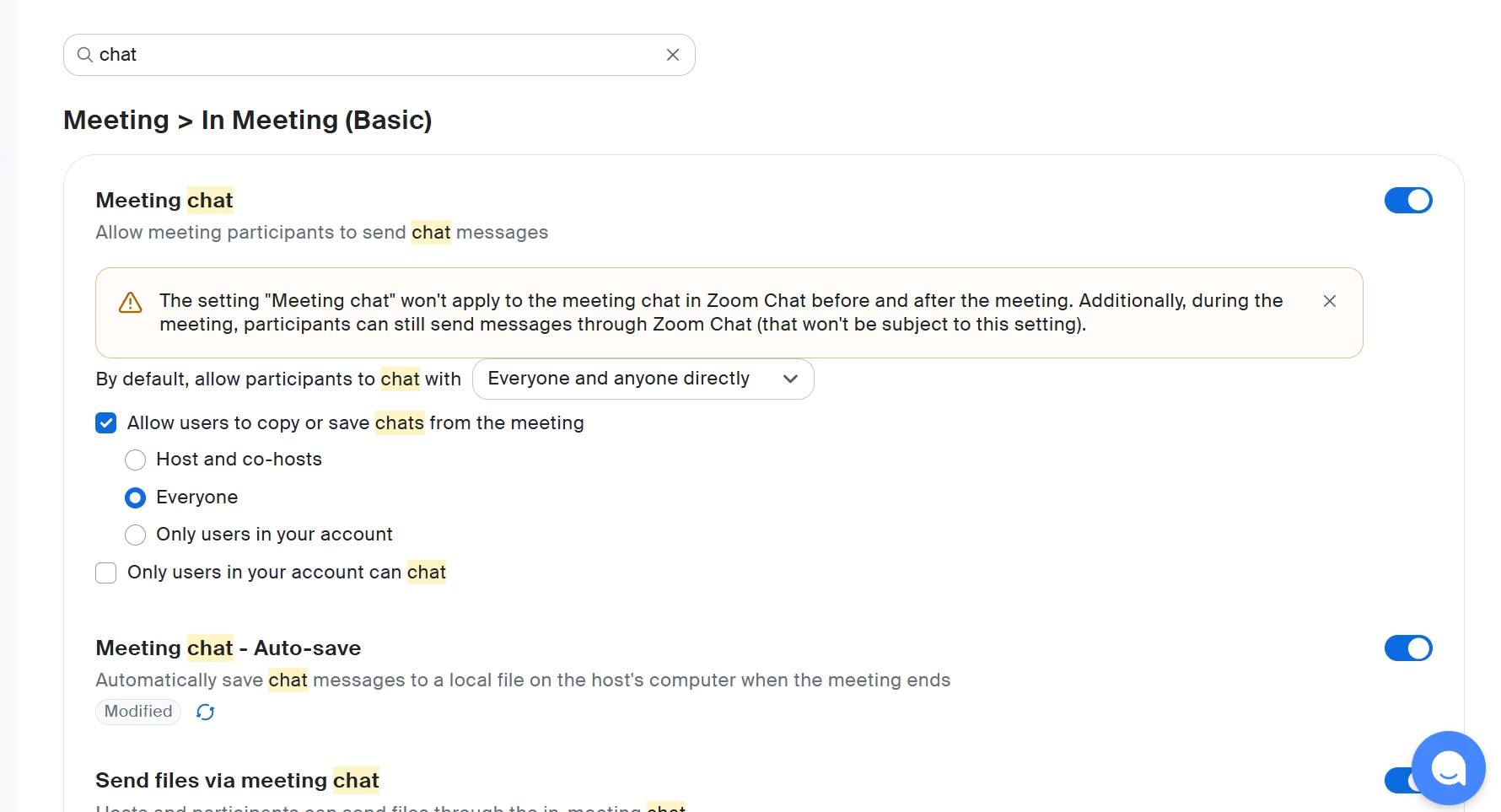
    Two things. You need chat enabled. Maybe your organistion turned it off. You can check your personal settings here in your room settings. Hoose meetings from the top and type in chat.


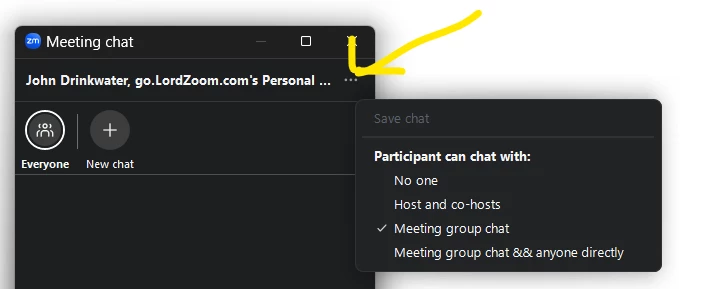
    Also the host or cohost can change the settings in the meeting form the chat window.


    All the best


    John Drinkwater

    Zoom Community Super Champion

    I am not a Zoom Employee

    https://www.linkedin.com/in/johndrinkwaterlordzoom/

    https://www.youtube.com/@boomwithlordzoom


    1 reply

    ExpertswhoJohn
    Community Super Champion | Customer
    Community Super Champion | Customer
    September 30, 2026

    hi ​@kvm 

    Two things. You need chat enabled. Maybe your organistion turned it off. You can check your personal settings here in your room settings. Hoose meetings from the top and type in chat.


    Also the host or cohost can change the settings in the meeting form the chat window.


    All the best


    John Drinkwater

    Zoom Community Super Champion

    I am not a Zoom Employee

    https://www.linkedin.com/in/johndrinkwaterlordzoom/

    https://www.youtube.com/@boomwithlordzoom


    Translate