

Switch off voice prompt for basic user - Recording Notifications | Community
Skip to main content
Explorer
March 8, 2022
Solved

Switch off voice prompt for basic user - Recording Notifications

  • March 8, 2022
  • 1 reply
  • 1 view

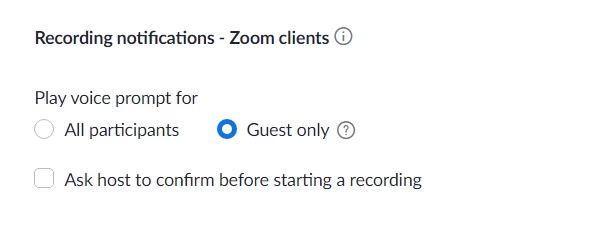
As a basic user 'Recording notification' play voice prompt to 'no-one' is not an option.  Zoom say this voice prompt can be disabled for all accounts as per the Zoom notes: 

  1. Under Play voice prompt for, choose if you want All participants, Guest only, or No One to hear the audio recording notification.

so why is the option not there?
    Best answer by Yourspace2015

    OK well that's progress!  This is what I see.  So how can it be different?


    I have found the solution.  I need to select that we are an educator (which we are) then this opens up the option.  Thanks for your help.  Really appreciate it.

    1 reply

    Alex_PFT
    Partner
    Partner
    March 8, 2022

    Hi,

    It is there, on the web portal, under Settings / recording


    Modifying recording notifications – Zoom Support


    Alex

    zoom@pft

    Explorer
    March 8, 2022

    Thanks but on my basic version 'no-one' does not appear as an option.  Strange.  It does show in my pro account but not on my basic version.  Is this screen shot from a pro+ account?

    Alex_PFT
    Partner
    Partner
    March 8, 2022

    I tried with both a licensed and not licensed account, I had the same options.  


    Alex

    zoom@pft