sharing meeting recordings | Community
Skip to main content
Newcomer
May 9, 2022
Solved

sharing meeting recordings

  • May 9, 2022
  • 3 replies
  • 5 views

I recorded a meeting and am trying to share it.

Poeple that I sent it to are telling me that it requires a pascode, so I sent to the settings and took away the passcode for accessing recordings, but it only applies to future meetings.

Where do I find the passcode for recorded meetings? I tried the original meeting passcode but it's not valid.

Thanks in advance 🙂

    Best answer by Ray_Harwood

    Hi, @SusannaG... I recently had the same issue -- sent out a video link and a passcode to someone, and they couldn't see it.  It took me hours to figure out why!!


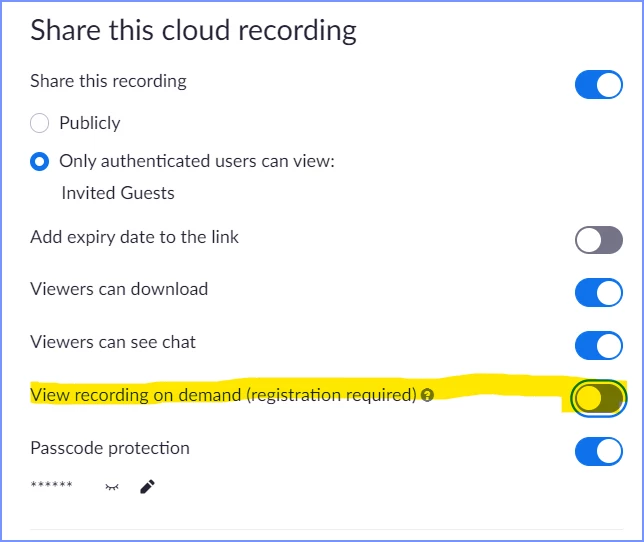
    On your Recordings display, click the recording you want to share.  Click the Share button at the far right.  This window will pop up:

    TURN OFF View recording on demand.  That option ON means that the viewer has to have registered for your meeting/webinar.  


    Note that if you ONLY want registered attendees to view the file, then this switch ON is very important.  But most of us just invite a few people, record a meeting, and then want to share the video to the folks that were there... and hope that they don't share it to the entire universe.

    3 replies

    Ray_Harwood
    Community Super Champion | Customer
    Community Super Champion | Customer
    May 9, 2022

    Hi, @SusannaG... I recently had the same issue -- sent out a video link and a passcode to someone, and they couldn't see it.  It took me hours to figure out why!!


    On your Recordings display, click the recording you want to share.  Click the Share button at the far right.  This window will pop up:

    TURN OFF View recording on demand.  That option ON means that the viewer has to have registered for your meeting/webinar.  


    Note that if you ONLY want registered attendees to view the file, then this switch ON is very important.  But most of us just invite a few people, record a meeting, and then want to share the video to the folks that were there... and hope that they don't share it to the entire universe.

    Newcomer
    March 1, 2023

    Had the same problem. Thank you, I will try that 🙏

    SusannaGAuthor
    Newcomer
    May 9, 2022

    Thank you so much Ray! All good ☺️

    Newcomer
    June 6, 2022

    I use www.bublup.com to download a private file and give links out to those parents, the link within that bublup account. It works great and is free. That way, after the recording is on my computer, download it there, then delete it from my computer. Frees up space and is safe. Hope this helps!