Security | Community
Skip to main content
Newcomer
January 24, 2022
Solved

Security

  • January 24, 2022
  • 3 replies
  • 4 views

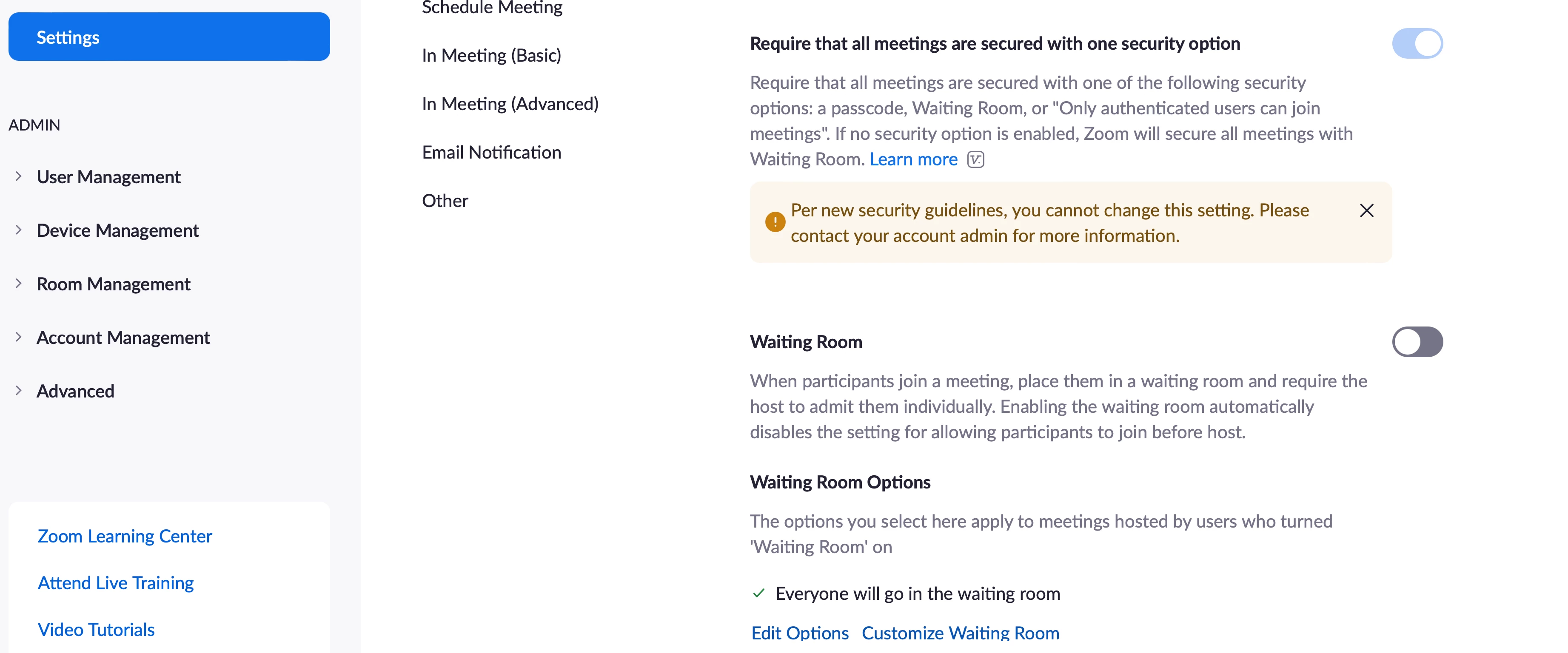
I am unable to change the setting as the account owner to bypass the waiting room and just use a passcode. Please advise. 

"Require that all meetings are secured with one security option"

 
    Best answer by pastorstembridg

    This is my admin page. I have disabled the item. but it still requires the waiting room.

    3 replies

    jeremyjustin
    Community Champion | Employee
    Community Champion | Employee
    January 24, 2022

    Hi @pastorstembridg thank you for your post here on the Zoom Community! I did some checking on this setting and found that 


    • This setting is required to be enabled for these accounts: single licensed user, Pro accounts with 2 or more licenses, and Business accounts with 10-100 licenses.
    • The following accounts can enabled or disabled this setting: Enterprise, API, Business (with more than 100 licenses), and Education.

    I was able to find this information from a different support article here https://support.zoom.us/hc/en-us/articles/360034675592


    I've requested that we add this information to the support article talking about this setting specifically: https://support.zoom.us/hc/en-us/articles/360059665892-Requiring-meetings-to-have-one-security-option


    Basically, all Zoom accounts meeting the above criteria will have this setting enabled and locked. Essentially this means that every meeting will be required to have some type of security protection. This article talks about the logic: https://support.zoom.us/hc/en-us/articles/360059665892-Requiring-meetings-to-have-one-security-option


    If this has answered your question to your satisfaction, please click the "Accept as Solution" button below but if not please reply and we can continue the  discussion. Thank you! 


    Newcomer
    January 24, 2022

    Thank you for your reply. I am a single license pro user. I can understand the security requirement, but I am just trying to make it where they must use the passcode to attend. Currently it forces them to the waiting room and if I am unable to join the meeting cannot start. 

    jeremyjustin
    Community Champion | Employee
    Community Champion | Employee
    January 24, 2022

    Hi @pastorstembridg gotcha! Ok no problem, the good news is this option being enabled (Require that all meetings are secured...)" will let you disable waiting room as long as you have the option to enable a passcode for meetings enabled.  You don't need them both enabled, but you do at least need passcodes required. 


    In the Zoom portal under your Account Management, Account Settings, I would disable the Waiting Room setting. You can even disable and click the little lock icon to turn this off for all meetings

    Then scroll down just a little and enable the "Meeting Passcode" setting. You can also lock this setting so that every meeting scheduled will have a passcode by default. You can also apply this setting to meetings you've already scheduled by checking the little box:

    Now, all your meetings will NOT have waiting room enabled, but they will all have a passcode.  If you scroll down in that section there are a few other settings you may want to tweak like requiring a passcode for people who connect via phone, but you may not have any users dialing in. 


    One other setting to check and decide upon is the Join Before Host setting. If you want people to be able to join your meetings before you and start talking with each other, enable this setting. Basically this will let people have the meeting even if you are not there. If this is something you desire, you can enable and lock if you wish, and if you want to specify how many minutes people can join before the meeting start time that is not a bad idea either. Otherwise they could join the meeting at any time before it starts:


    If this has answered your question to your satisfaction, please click the "Accept as Solution" button below but if not please reply and we can continue the  discussion. Thank you!

    GreggG_aka_4G
    Community Champion | Employee
    Community Champion | Employee
    January 24, 2022

    Hello Pastorstembridg - if you could please verify the following under account settings > Security > Waiting room. As you can see in my example, it is turned on at the Account level. You can also create a specific user group for folks to have this option disabled. For more information on setting up Waiting rooms, please visit: https://support.zoom.us/hc/en-us/articles/115000332726-Waiting-Room.


    Here is an example of the admin page I referred to. 


    pastorstembridgAuthorAnswer
    Newcomer
    January 24, 2022

    This is my admin page. I have disabled the item. but it still requires the waiting room.

    Newcomer
    January 24, 2022

    As I bang my head and slap myself, I am grateful for your guidance. I was in the personal  section and not account section. You have all successfully assisted a Zoom novice. 

    jeremyjustin
    Community Champion | Employee
    Community Champion | Employee
    January 24, 2022

    Great!!! No worries @pastorstembridg thanks for working through it with us 🙂