

Screen-Sharing Glitch | Community
Skip to main content
Newcomer
April 15, 2025
Solved

Screen-Sharing Glitch

  • April 15, 2025
  • 2 replies
  • 9 views

My wife uses an Apple tablet to access the internet. On a Zoom meeting that I initiate, she can't share her screen. When she clicks "share screen", Zoom brings up a "broadcast" page and starts recording. How can she share her screen?  I've tried all the "solutions" like making her host, enabling screen sharing with all participants etc.  I can share my screen (from my Windows 11 laptop), but she cannot share hers.  Tried the virtual assistant.  It was useless.  Any advice greatly appreciated.
Best answer by lancetlc
Hey @woofna1 
 
If "Share Screen" in Zoom opens a "broadcast" page and starts recording, it likely means the user is using the "broadcast" feature, which is designed for sharing content to multiple devices or platforms. To share the screen in a normal Zoom meeting, the user needs to click the "Share Screen" button during the meeting and then select the screen or application they want to share, then click "Share". 
 
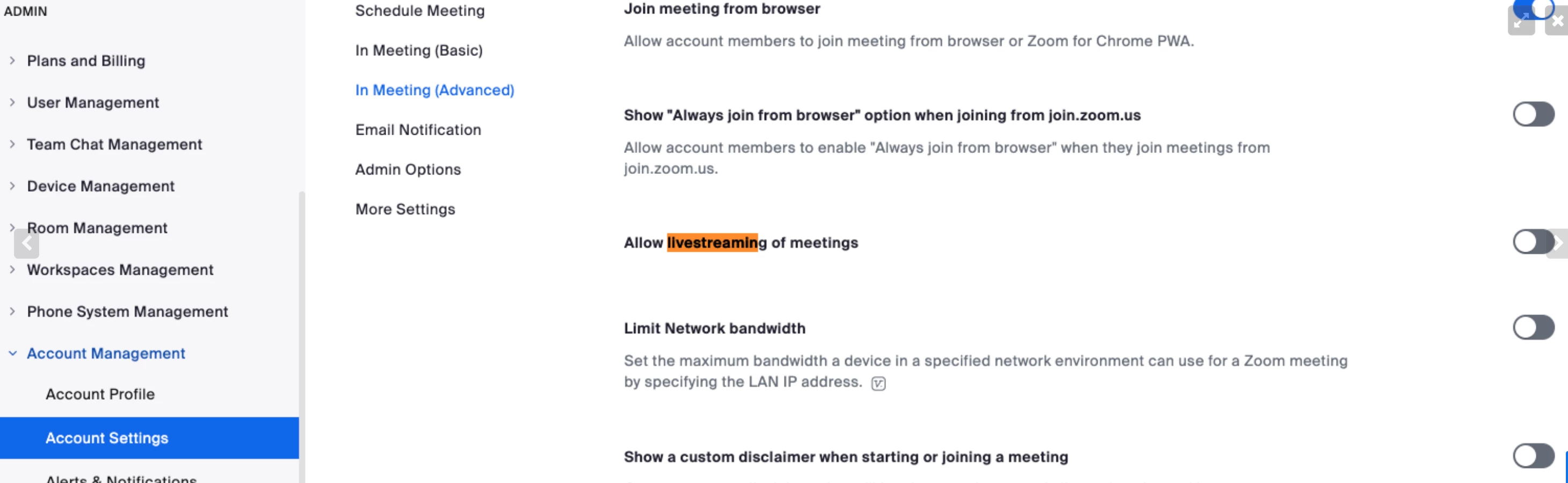
For good measure, please navigate to zoom.us> Admin> Account Settings> Meeting

Toggle "Allow Livestreaming of Meetings" OFF.

2 replies

lancetlcAnswer
Employee
April 21, 2025
Hey @woofna1 
 
If "Share Screen" in Zoom opens a "broadcast" page and starts recording, it likely means the user is using the "broadcast" feature, which is designed for sharing content to multiple devices or platforms. To share the screen in a normal Zoom meeting, the user needs to click the "Share Screen" button during the meeting and then select the screen or application they want to share, then click "Share". 
 
For good measure, please navigate to zoom.us> Admin> Account Settings> Meeting

Toggle "Allow Livestreaming of Meetings" OFF.

MGSR
Community Manager
Community Manager
July 21, 2025

Hi @woofna1! I wanted to let you know that I’ve marked @lancetlc's response as the accepted solution, as I believe it answers your question. If you have any more questions or need further clarification, feel free to ask.