

Recording problem | Community
Skip to main content
Newcomer
April 18, 2022
Solved

Recording problem

  • April 18, 2022
  • 3 replies
  • 4 views

Until now I have never ever had problems to make a recording on my computer. Now when I try to start it, it opens the options window where I don't see anything wrong and there is no option to start the recording.  Can anybody help me, please?
Best answer by JepZoom

Thank you very much JepZoomie. 
How do I go about Cloud recording for Zoom Mobile Application?


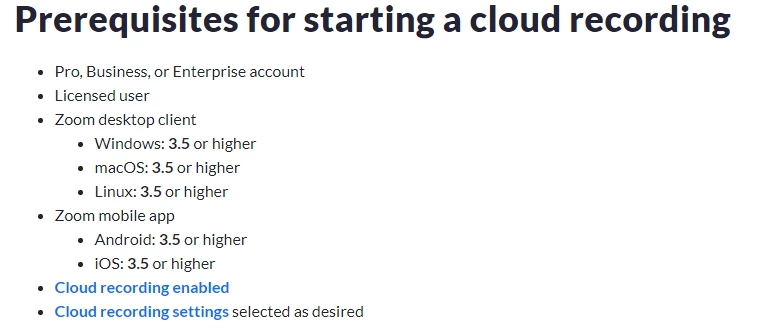
Here are the prerequisites of the cloud recording:


after meeting those prerequisites, you may then start a meeting, click record, and you should see an option for cloud recordings if you are on Desktop computer and record through the cloud when you are using the Zoom mobile application.

Here is the article that you can check regarding cloud recording: https://support.zoom.us/hc/en-us/articles/203741855-Starting-a-cloud-recording

3 replies

Newcomer
April 18, 2022

Can you send some screenshots on how it looks like?

AlannahAuthor
Newcomer
April 18, 2022

 I click on Record, after choose Record on this computer and it openes this.

Newcomer
April 18, 2022

It appears that you need to select where you will store your local recordings at.

Newcomer
April 18, 2022

Hi good morning. I am having the same issue on my computer and andriod for months now.  Today I have finally made some head way I believe. Recording can only be done via a computer. When scheduling your meeting via a computer only you will see the option to allow local recording via computer. There is no option for android etc. I sent screen shots of a meeting with no options via browser. This doesn't have an option to record. "Download Now" and you will be able to record, however remember to choose the option and save when doing the scheduling of meeting.
I hope this helps.

Newcomer
April 18, 2022

Can you please send some screenshots?

Newcomer
November 5, 2022

I had this same problem on my computer after updating to a new version of zoom.  Windows started blocking access to the documents folder where Zoom was doing the recordings due to the Controlled Folder Access security feature.  Apparently the update made Windows think it was a different program than the one that created the documents\zoom folder and blocked access to it.  The folder became ReadOnly to the zoom program.   I changed the permissions to the folder and all descendants to remove the ReadOnly permission.  I also put Zoom on the list of apps that were exempted to the Controlled Folder Access protection feature.


I suspect that this will become a major problem for all Zoom users on Windows with the Controlled Folder Access feature.   I consider this to be a MAJOR BUG because the new version of Zoom should know how to automatically gain access to its existing folders after updating to eliminate this very confusing problem that prevents zoom from recording with no error message or explanation of why recording isn't occurring as it should be.