

Recording lost | Community
Skip to main content
Newcomer
March 28, 2023
Question

Recording lost

  • March 28, 2023
  • 2 replies
  • 10 views

Hello,

I would like to ask you one question. In January I made an very important call which was recorded via Zoom. Not knowing how the Zoom works, I thought it will be saved in my acccount just on MS Teams and therefore I dont have to save it. Nevertheless the Zoom asked me if I want to save recording on Cloud or to computer. I didnt want to upgrade my account, so I have chosen the option save to desktop. The problem is, my desktop was damaged and unable to restore the data. So I lost the way to my recording. Is there any chance , how I can get my recording back via Zoom? Or how to reach customer service, any mail or phone number or person I can contact? Do they somehow have access to your account and content? Thanks a lot.
 

    2 replies

    Newcomer
    March 28, 2023

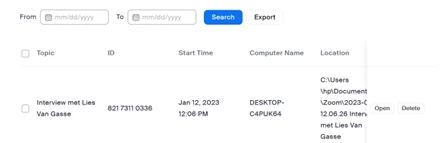
    Check your recording list and the cloud

    Newcomer
    April 14, 2023

    Unfortunately, Zoom just keeps the local record of where the recording saved and does not keep a copy of the recording for themselves. Cloud recordings save on Zoom Servers, but after 30 days in the trash they are also deleted permanently and Zoom does not have a way to recover them.


    Since it saved in your documents folder there's a chance if you have Dropbox, OneDrive, or something similar, it might have been saved and backed up by one of those services, but Zoom does not keep a copy of any local recordings.

    Newcomer
    May 6, 2025

    I am having a similar issue... I recorded a meeting to the cloud last week (4/29/2025) and it never populated... I have the meeting ID but I am having a hard time connecting with zoom customer service. Can this recording be retrieved? I double checked my computer to see if I accidentally recorded to my device instead of the cloud... nothing is saved there... any help would be appreciated. 


    Newcomer
    May 6, 2025

    If you check here: https://www.zoom.us/recording/ you should see it under one of the tabs if it was recorded, if it is not under one of the tabs then it was not recorded by Zoom.