Profile Names in Meetings Display Then Disappear | Community
Skip to main content
Newcomer
January 19, 2022
Solved

Profile Names in Meetings Display Then Disappear

  • January 19, 2022
  • 3 replies
  • 5 views

When I'm on a Zoom call, the names of participants display for a second or two and then disappear. I have to keep moving my cursor over the main window to bring them back.


Is there a way to keep the names on for the duration of the meeting?

    Best answer by GreggG_aka_4G

    Hello Cp22 -


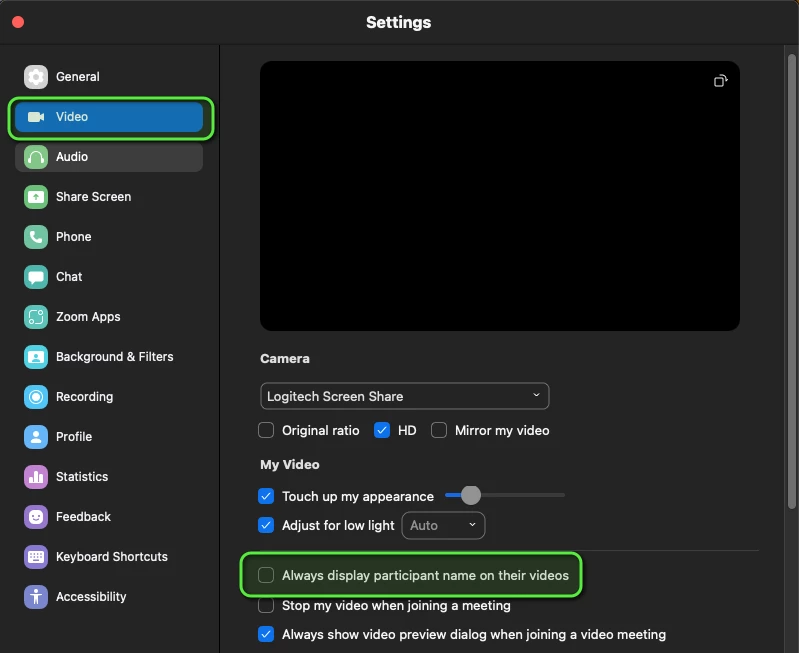
    Under settings, go to Video, then select the option to "Always display participant name on their videos."


    3 replies

    GreggG_aka_4G
    Community Champion | Employee
    Community Champion | Employee
    January 19, 2022

    Hello Cp22 -


    Under settings, go to Video, then select the option to "Always display participant name on their videos."


    Cp22Author
    Newcomer
    January 21, 2022

    Thank you!

    Newcomer
    January 17, 2023

    My screen does not look like that. When I open settings there is no sidebar. I don't know where else to go. 

    Help please

    Newcomer
    January 17, 2023

    GreggG_aka_4G
    Community Champion | Employee
    Community Champion | Employee
    January 17, 2023

    Could you open up the setting on the client, not via the web portal? You should then see that option available to you. Click on your profile picture in the upper right side of the client. I've highlighted that section in a red square. Click Video, scroll down, and select "Always display participant name on their video."