

Permanently Disable In-Meeting Chat Preview? | Community
Skip to main content
StefanScherbik
Community Champion | Customer
December 6, 2023
Question

Permanently Disable In-Meeting Chat Preview?

  • December 6, 2023
  • 5 replies
  • 266 views

This is something I never noticed myself as I always keep the right-side chat panel open during meetings.  But apparently, as of the April 2022 release of Zoom, there is a Chat Preview popup which appears for in-meeting chat if you do not have the chat panel/popup open.  It hovers over the Chat button briefly every time someone chats:
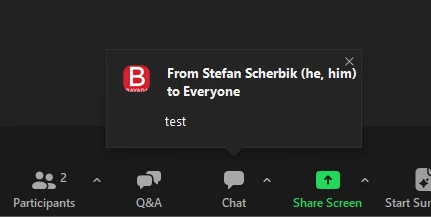


A user of mine was asking if it was possible to permanently disable this popup, as it is a bit annoying (something I agree with).  If one hits ^ next to the chat button, there is an option to disable this chat preview.  However, unchecking this option only lasts for the duration of your meeting.  If you leave the meeting and join another meeting, the Show Chat Previews option goes back to being turned on by default.
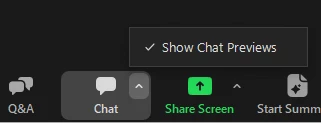


Does anyone know of a way to permanently disable this chat preview, so that it stays off, and doesn't get re-enabled every time one joins a meeting?  I couldn't find any admin settings regarding the in-meeting chat preview, nor any user-level settings.


It is true that having the chat panel open prevents these previews from popping up, but some users might not want to have the chat panel open nor have the preview pop up.

5 replies

Explorer
February 23, 2024

I wish, I checked and you can either disable chat, or the chat preview is active and you have to disable it per session on your client...  I submitted it as a feature request

Newcomer
April 13, 2026

This is still a problem. This setting does not persist and must be reset every meeting.

New Member
June 4, 2026

I would like this feature as well! It’s annoying to have to turn off chat previews every meeting and I’m currently using zoom with a large group almost daily.

Newcomer
June 4, 2026

If you're referring to the chat preview pop-ups that appear during meetings, the ability to permanently disable them depends on the platform you're using. In many meeting applications, you can turn off chat notifications or message previews through the app's notification settings. Look for options such as Show chat previews, Message notifications, or In-meeting notifications and disable them.

If you've already checked the settings and don't see an option to permanently disable chat previews, it may not currently be supported by the platform. In that case, submitting feedback or a feature request would be the best way to let the product team know there's demand for this functionality.

Could you let us know which meeting platform you're using (e.g., Zoom, Microsoft Teams, Google Meet, Webex)? That will help provide more specific guidance.

Newcomer
June 4, 2026

I would love the ability to permanently disable in-meeting chat previews. They can be distracting during presentations and meetings, and having a simple setting to turn them off completely would improve the overall user experience.