

Note transcription features disabled by host even though I’m the account owner | Community
Skip to main content
Newcomer
May 23, 2026
Question

Note transcription features disabled by host even though I’m the account owner
  • May 23, 2026
  • 1 reply
  • 172 views

Hi. I’m the account owner and host, and I already enabled all the AI Companion and transcript settings in the Zoom web portal. But inside meetings I still can’t enable transcription or My Notes. It keeps saying that the feature “has been disabled by the host” even though I am the host.

I create meetings using my PMI. Previously, note transcription would start automatically as soon as I joined the meeting. I could see and edit the live notes/transcript while me and the other participant were talking.

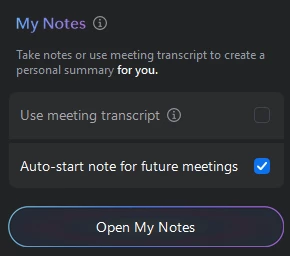
Now, nothing starts automatically when I enter the meeting. I only see a greyed out box that I can’t click.

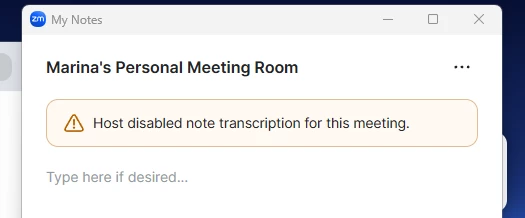
And when I press “Open My Notes” Zoom says: “Host has disabled note transcription for this meeting.”

I haven’t changed any settings on my side, and all AI Companion / transcript settings appear to be enabled in the Zoom web portal.

Do you know what could be causing this?

1 reply

Contributor I
May 23, 2026

This honestly sounds like either a PMI-specific setting conflict or a Zoom account sync issue rather than the feature actually being disabled. Since it worked before and suddenly stopped without changes on your side, I’d check whether the PMI meeting settings are overriding your global AI Companion settings because personal meeting IDs sometimes keep older configs cached separately. Also try scheduling a completely new non-PMI meeting and test if transcription/My Notes works there. If it does, then the issue is most likely tied specifically to the PMI configuration. Another possibility is that Zoom silently changed a policy or reset a permission after an update, especially if the option is showing greyed out even for the account owner.