
Bishwa Rai
New Member
New Member
October 20, 2026
Question

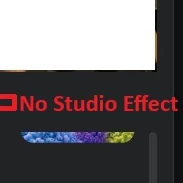
No Studio Effect

Hi Friends,


I no longer have the studio Effect option available. Is anyone having this issue? I have the latest version installed 7.2.1(48556)


Bishwa

    5 replies

    Employee
    October 21, 2026

    Hi Bishwa, 

    Are you referring to the zoom workplace client settings → Video &effects → Studio effects or anything else? Could you help provide a screenshot of that if possible?
    Thanks & regards.

    Translate
    Bishwa Rai
    New Member
    New Member
    October 21, 2026

    Here is the screenshot.


    Translate
    Bishwa Rai
    New Member
    New Member
    October 21, 2026


    Translate
    Eliot
    Community Super Champion | Partner
    Community Super Champion | Partner
    October 21, 2026

    hi ​@Bishwa Rai 

    Enhancing your video in Zoom provides details on using studio effects.

    Apply studio effects
    The studio effects feature allows you to apply eyebrows, mustache or beard, and lip color filters as part of your video appearance. 

    When you turn on this feature during a meeting, Zoom’s technology uses your device’s camera to detect the movements and positioning of your face to apply the selected filter effect. Such data does not leave your device, is not retained, is not used to identify you, and is only used to generate the selected effects.

    Note: The studio effects feature may not be available for all regions and account types. If you do not see a specific feature, you may not have access to use it.

    “Windows | macOS
    Sign in to the Zoom desktop app.
    Click your profile picture, then click Settings.
    Click the Video & effects  tab.
    Click the Studio effects tab.
    Choose options from the Eyebrows, Mustache & beard, and Lip color sections.
    Your video preview will change based on the adjustments you make.
    (Optional) Below the studio effects options, click the Apply to all future meetings toggle to apply this filter as the default for all meetings you join or host.

    The only change is see is in number 4 above.  the tab is now Effects.

    Please see attached screen shot.

    Check to see that the toggle for Apply to all future meetings is turned on for the current and future meetings.

    thanks,  eliot


    Translate
    Eliot
    Community Super Champion | Partner
    Community Super Champion | Partner
    October 21, 2026

    hi ​@Bishwa Rai 

    there is a note “Note: The studio effects feature may not be available for all regions and account types. If you do not see a specific feature, you may not have access to use it.”

    I am located in Las Vegas, NV, USA.  Maybe it has something to do what region you are located in or your account type?

    you might try a CleanZoom reinstall.

    1. Download and run CleanZoom.
      Note: Use of the clean uninstaller will completely remove the Zoom desktop app, as well as the Zoom plugin for Outlook. The Outlook add-in, Chrome/Firefox extensions, and Google Workspace add-on are unaffected.
    2. Once completed, download Zoom from our Download Center and reinstall.

    Thanks,  eliot

    Translate