"No Report is Available" when trying to obtain logs from recent meetings | Community
Skip to main content
Explorer
April 23, 2026
Solved

"No Report is Available" when trying to obtain logs from recent meetings

  • April 23, 2026
  • 2 replies
  • 68 views

Hello Community,

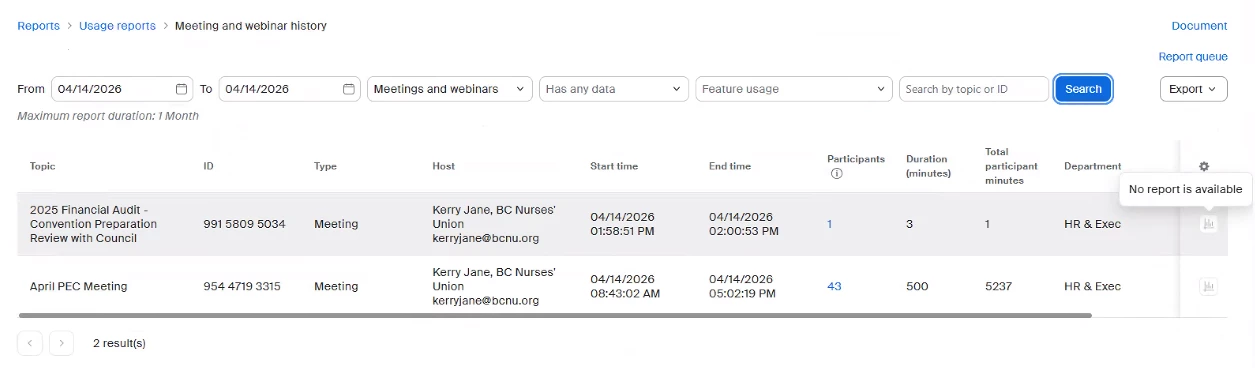
One of our enterprise premier users has encountered an issue with generating Zoom logs for their two recent meetings that took place on April 14th. In the provided Screenshot, the user has two meetings. But she cannot generate reports using the icons on the right side. I as an administration have tried to generate the reports for her as well, but the Report icon is greyed out for these and all other meetings for our tenet.

Please can I have assistance with troubleshooting this issue?

Sincerely,
Terrence Narayan

BCNU IT Support Technician

    Best answer by iambobsat

    Hi Terrence,

    Thank you for reaching out and for the detailed screenshot — that's very helpful.

    The greyed-out report icon showing "No report is available" across all meetings for your tenant typically points to one of the following:

    1. Cloud Recording or Report Generation Not Enabled at Account Level Meeting reports (participant details, polling data, etc.) require that the "Usage Reports" feature is fully enabled for your account. As an Enterprise Premier customer, this should be available, but it's worth confirming under Admin → Account Management → Account Settings that reporting permissions haven't been inadvertently changed.

    2. Data Processing Delay Zoom's reporting data can sometimes take up to 24–48 hours to become available after a meeting ends. However, since the meetings were on April 14th and you're well past that window, this is less likely the cause — unless there's a backend processing issue on Zoom's side.

    3. Tenant-Wide Issue (Most Likely) Since you mentioned the report icon is greyed out for all meetings across your entire tenant — not just these two — this strongly suggests a backend or provisioning issue on Zoom's side rather than a settings problem. This is not something that can be resolved through the admin portal alone.

    Recommended Next Steps:

    • I'd recommend opening a support ticket directly with Zoom at support.zoom.us and referencing this issue — specifically that report generation is greyed out tenant-wide.
    • Include the screenshot you shared here, the meeting IDs (991 5809 5034 and 954 4719 3315), and note that this affects all meetings, not just these two.
    • Zoom's support team can check the backend provisioning for your tenant's reporting capabilities.

    This is most likely a server-side issue that needs Zoom engineering to investigate for your specific tenant.


    2 replies

    iambobsat
    Community Champion | Employee
    iambobsatAnswer
    Community Champion | Employee
    April 26, 2026

    Hi Terrence,

    Thank you for reaching out and for the detailed screenshot — that's very helpful.

    The greyed-out report icon showing "No report is available" across all meetings for your tenant typically points to one of the following:

    1. Cloud Recording or Report Generation Not Enabled at Account Level Meeting reports (participant details, polling data, etc.) require that the "Usage Reports" feature is fully enabled for your account. As an Enterprise Premier customer, this should be available, but it's worth confirming under Admin → Account Management → Account Settings that reporting permissions haven't been inadvertently changed.

    2. Data Processing Delay Zoom's reporting data can sometimes take up to 24–48 hours to become available after a meeting ends. However, since the meetings were on April 14th and you're well past that window, this is less likely the cause — unless there's a backend processing issue on Zoom's side.

    3. Tenant-Wide Issue (Most Likely) Since you mentioned the report icon is greyed out for all meetings across your entire tenant — not just these two — this strongly suggests a backend or provisioning issue on Zoom's side rather than a settings problem. This is not something that can be resolved through the admin portal alone.

    Recommended Next Steps:

    • I'd recommend opening a support ticket directly with Zoom at support.zoom.us and referencing this issue — specifically that report generation is greyed out tenant-wide.
    • Include the screenshot you shared here, the meeting IDs (991 5809 5034 and 954 4719 3315), and note that this affects all meetings, not just these two.
    • Zoom's support team can check the backend provisioning for your tenant's reporting capabilities.

    This is most likely a server-side issue that needs Zoom engineering to investigate for your specific tenant.
    Explorer
    April 28, 2026

    Hi iambobsat,


    Thanks you kindly for your response. I’ll admit that I don’t have complete access to the Admin > Account Management > Account Settings menu. Therefore, I’ve asked my supervisor if he can first check if reporting permissions are disabled tenant wide.


    If this is not the case, then I will open a support ticket.

    Sincerely,

    Terrence