

No access to meeting via Browser - how to change that | Community
Skip to main content
Newcomer
August 25, 2025
Solved

No access to meeting via Browser - how to change that

  • August 25, 2025
  • 1 reply
  • 48 views

The participant I invited to a meeting was unable to join via the browser. She was supposed to download the Zoom app first, but she didn't want to. Until now, everyone could join the Zoom meeting via the invitation link and no one had to download the Zoom app. What happened here? This is a major disadvantage for my online meetings with Zoom if it no longer works via browser. Where do I change this?
 

Best answer by aileenfelix

Hi  - welcome to the Zoom Community.  

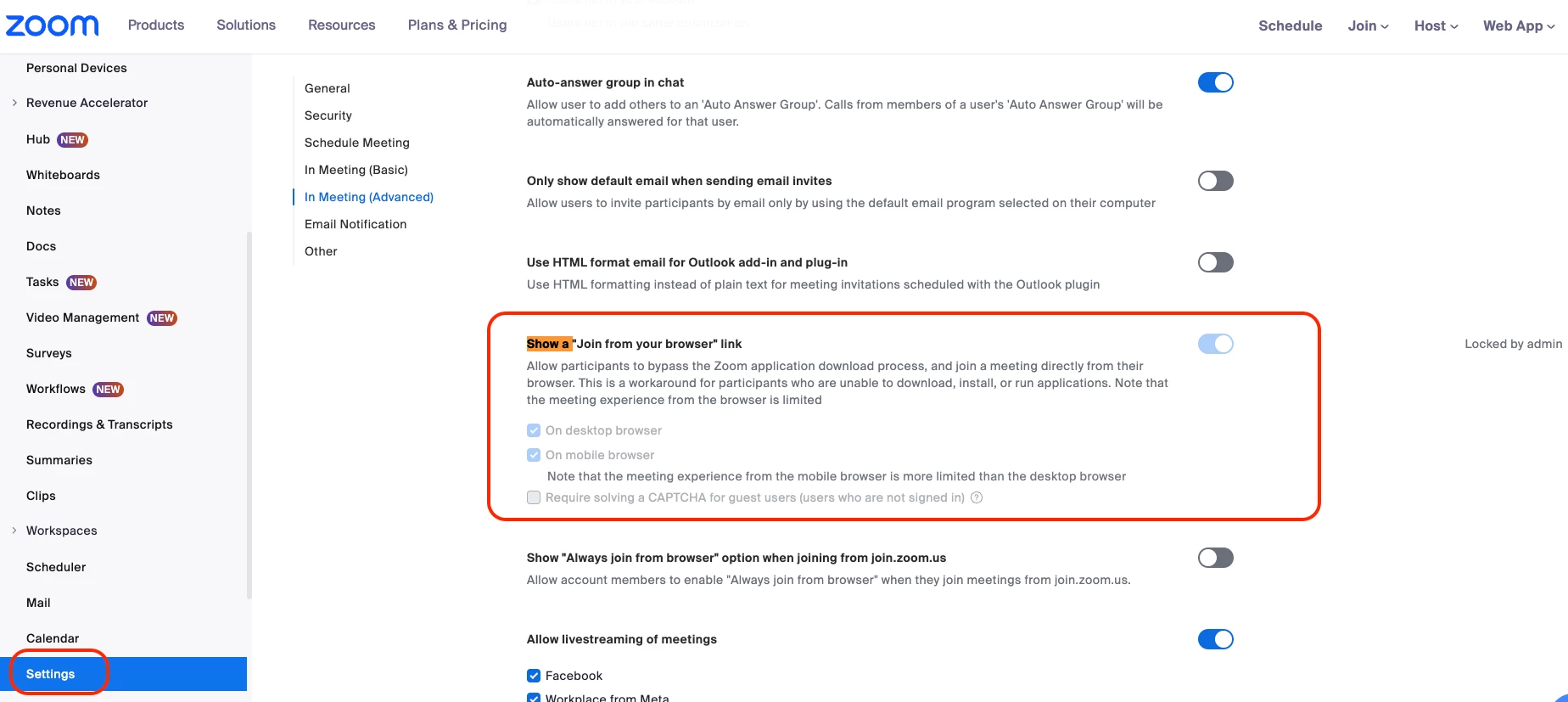
Kindly check this setting in the Zoom web portal to ensure the "Join from your browser" link is always available.


  1. Log in to zoom.us and sign in with your account.
  2. In the navigation menu on the left, click on "Settings."
  3. Click on the "Meeting" tab
  4. Under the "In Meeting (Advanced)" section, look for the option that says "Show a 'Join from your browser' link.” Simply toggle this setting to enable it. 

    By enabling this setting, the "Join from your browser" link will appear as a more direct option when a user clicks on the meeting invitation link, making it much easier for them to join without having to download the app. Please see sample screenshot below.


1 reply

Employee
August 25, 2025

Hi  - welcome to the Zoom Community.  

Kindly check this setting in the Zoom web portal to ensure the "Join from your browser" link is always available.


  1. Log in to zoom.us and sign in with your account.
  2. In the navigation menu on the left, click on "Settings."
  3. Click on the "Meeting" tab
  4. Under the "In Meeting (Advanced)" section, look for the option that says "Show a 'Join from your browser' link.” Simply toggle this setting to enable it. 

    By enabling this setting, the "Join from your browser" link will appear as a more direct option when a user clicks on the meeting invitation link, making it much easier for them to join without having to download the app. Please see sample screenshot below.