

Navigating Host Tools Took a Big Step Backward | Community
Skip to main content
Newcomer
March 6, 2026

Navigating Host Tools Took a Big Step Backward

  • March 6, 2026
  • 3 replies
  • 135 views


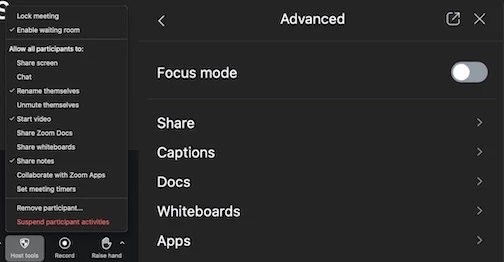
The interface on the right is not an improvement over that on the left. Seriously, why? I’m now clicking 25% more to get to my same configuration for my meetings. I’m not opposed to putting the controls in the sidebar, but drilling down multiple levels is a serious regression in usability.

    3 replies

    Newcomer
    March 6, 2026

    Agreed. I teach Zoom Security, and the new tools are cumbersome and less intuitive.

    storyhub
    Community Super Champion | Customer
    Community Super Champion | Customer
    March 6, 2026

    If you do not like the design for host tools the old design plus other functions is still available under settings


    mrtonerAuthor
    Newcomer
    March 10, 2026

    @storyhub, could you point me to exactly where in Settings I can change how Host Tools operates? You’re showing a screenshot of the Appearance options, but I don’t find anything there to return Host Tools to a popup menu in the toolbar.

    storyhub
    Community Super Champion | Customer
    Community Super Champion | Customer
    March 10, 2026

    Once again, what is shown is the settings interface which includes some settings that effect host tool functions but does not reorganize the menu. There is no menu style management in Zoom. There is some menu reorganization possible such as being able to pop out the host tools menu so it does not disappear everytime you make a share, or direct selection of host tools for participants or direct selection of host tools for sharing. But since you have not really stated your goal or workflow it is not possible to help you rethink why the menu is organized the way it is. Personally I like the design and find it easier to manage using macros. I can do one click that signs in to the account, starts the meeting, and makes some configuration changes. Share more details about what you are trying to do.

    Newcomer
    March 26, 2026

    I was having a hard time finding those settings. Now it seems they are scattered?

    When I make meetings, I usually lock down everything to prevent trolls from sabotaging the meeting. Then I let people do things like speak later when I allow. 

    The past two iterations of Zoom interface changes have only made me find these settings harder. 

    The ideal for me would be a central place to toggle all those settings. A bonus would be to click a single button to turn everything off instead of me every meeting having to click to disable one by one.

    storyhub
    Community Super Champion | Customer
    Community Super Champion | Customer
    March 27, 2026

    In the world of computers only one thing is constant - CHANGE. I use macros on three separate computers in 3 separate facilities to control 7 different Zoom meetings every Sunday. So when they redesign the UI I have to change 7 macros to start meetings and possibly 3 macros to end meetings. But those macros are configuring 3 of the 4 software apps used to operate the meeting for my operators and is far more productive than having to retrain 7 people every time a UI change affects the macros. Then Zoom webinar just becomes the software connecting the audience to the broadcast and is completely minimized. You could use macros to change settings during the meeting by popping out the UI windows or you could use the API to program single buttons to do certain functions. There is even hardware that has buttons that can do macros. So simplifying workflow can be done in various ways.