

My Meetings/Recurring Meetings Are Gone! The answer... | Community
Skip to main content
Ray_Harwood
Community Super Champion | Customer
July 12, 2023
Question

My Meetings/Recurring Meetings Are Gone! The answer...

  • July 12, 2023
  • 30 replies
  • 0 views

IMPORTANT UPDATE:


Zoom has listened! 


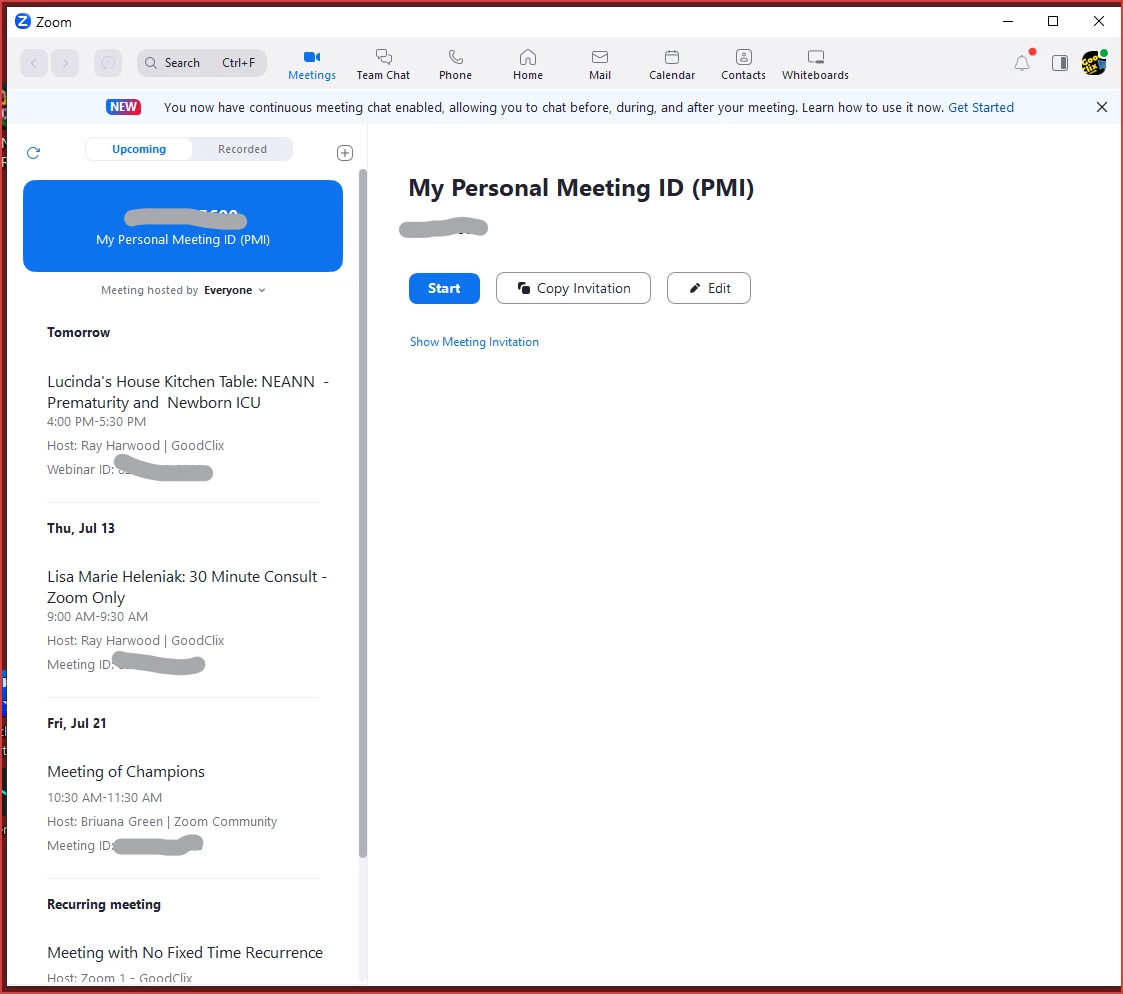
The removal of the Home tab and replacing the contents of the Meeting tab with the one-day calendar of events has been REVERTED.  Log out and back in on your desktop app to see the Home and Meetings tabs at the top, and select the Meetings tab to see the layout previously available prior to the roll-out of 5.15.3.


Please see this Zoom Support article for details:

https://support.zoom.us/hc/en-us/articles/17564111105677


My previous post from 7/12/2023 at 10:20am/MST is included below...


------------------------

Greetings, all!


Yes, the update to 5.15.3 has made a change to the Meetings tab. Please - no whining or complaining here - I'm just the messenger providing you with information!


Previously it looked like this. where you could see a list along the left side of all upcoming sessions (meetings and webinars):
 

Now it looks like this, with meetings ONE DAY AT A TIME on the right side:
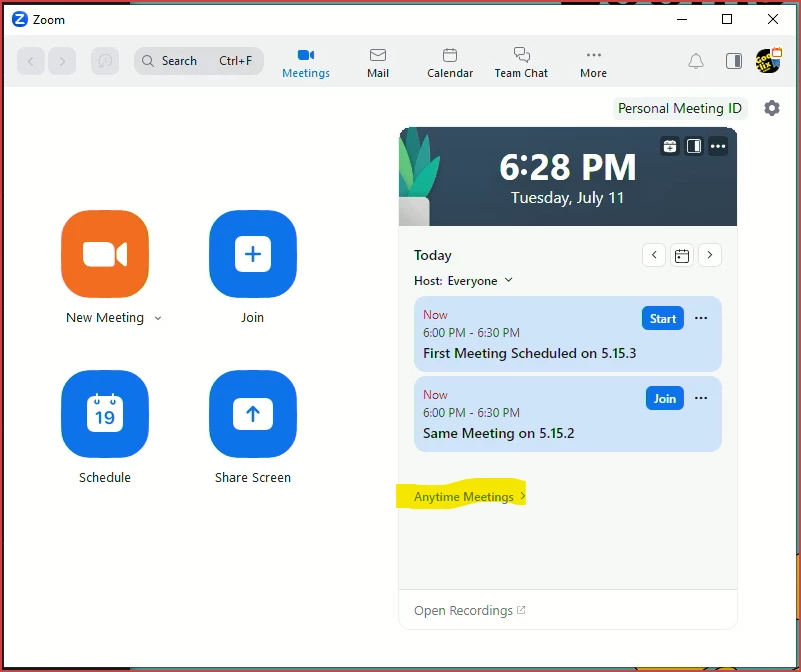
Click the arrows to move forward/backward in the calendar, or click the calendar icon for "today's meetings".


If you have any recurring meetings with no-fixed-time, they will be listed under the "Anytime Meetings" drop-down.  If you don't have any, the drop-down won't show.


This new view on the Meetings tab is what was previously on the Home tab... and the Home tab is now gone.

30 replies

Newcomer
July 12, 2023

Also note that you can't send an invitation for a meeting from the web browser login either!  This appears to be massive misunderstandings about how users use recurrent meetings.  Maybe programs can make a serous note here and fix it quick --- Please


And Thank you


Newcomer
July 12, 2023

HELP is needed urgently, Zoom!!!

Newcomer
July 12, 2023

I just uninstalled the app (on mac) and reinstalled it from the Zoom Download page - It's better - at least I can access my anytime meetings (recurrent anytime) now.  - not as easy or as good as it was, but at least I can find them. 


Process: 

  1. Uninstall app
  2. https://zoom.us/download
  3. Install the first option:  Zoom Desktop Client 

Good luck


Newcomer
July 12, 2023

Yes, this works. But it is a change no one asked for, it devotes most of the display space to info I don't need, and best of all this major interface change isn't documented in the release notes.

Newcomer
July 12, 2023

OMG, how disappointing! Is there any way I can get someone a zoom on the phone to talk about this? Earlier this year, they removed a feature that I used in every one of my meetings. There was no alternative or the replacement of that feature. I went through about six months of email with zoom support to no avail. Essentially after 15 or 20 email exchanges, was something like “it is what it is, we can’t resolve your issue, and we will continuously look for improvements”. Really?

Newcomer
July 13, 2023

Dear @WGM

It seems like if you are the business, business plus or enterprise contract customer and  the owner or technical support representative ,or is you are the premier/premier support plan user,  you can contact to them by the phone.


Other wise, chat is the best support. What is the service!!

by Chitosen1030

Newcomer
July 12, 2023

Cannot join a weekly meeting that I have been invited to, not one that is in "anytime meetings."  Please advise how to join.

Newcomer
July 13, 2023

Dear @marciesolomon


I am not the person you're responding, but just share my experience.

If no one is able to see the "anytime meetings "tab, first, just reboot the PC. 


Then if nothing happened, just restore zoom or update it as the newest.  Please force update. I've been waiting for regular updates, it was not happen.

If you have the latest ZOOM, you will beable to  see the "Anytime meeting" Tab.

And your set up meetings are not disappeared.
 

The surest way to see the meetings you have already set up for now is to go to https://zoom/us 

→ My account → Meetings → All Meetings.

You can see the all meetings you have booked there.

I hope this information helps you.
by chitosen1030


Newcomer
July 12, 2023

OK I accept what your saying but my meetings never looked like you describe.Are you saying that recurring meetings are no longer possible to be scheduled? And what happened to all my recordings.  It looks like I no longer have my old account at all even though it is paid as pro. I'm confused.

Newcomer
July 13, 2023

Hello @ShantaGabriel1 

I am not the person you're responding, but just share my experience.

Of course you can schedule recurring meetings. You can choose recurring when you schedule a meeting in the desktop ZOOM app.

And the meetings you've created so far haven't disappeared.

The surest way to see the meetings you have already set up for now is to go to https://zoom/us 

→ My account → Meetings → All Meetings. You can see the all meetings , you have booked, there.
No one knows when we will be able to see a list of all meeting schedules as before. So I decided to sync ZOOM with Google Calendar so I can see my ZOOM meeting schedule in Google Calendar and also set up ZOOM meetings from my calendar.
It is much less stressful than looking at just one day and one day from a small tab.
I hope this information helps you.
by chitosen1030

Newcomer
July 12, 2023

Are you starting from the Zoom website or the Zoom app? I'm working on a Mac desktop and the things you've described aren't appearing for me, no matter where I look. Zoom's ability to let me create standing links in the desktop app that worked any time, any day, indefinitely, was a critical feature!

Newcomer
July 12, 2023

I'm not the person you're responding to, but I'm in Windows and I can still create them, I just can't see them once they're created. 


Also, I just want to see upcoming meetings of all sorts not just the recurring/ anytime meetings. Now I have to open the webpage to see them. I haven't opened the webpage in more than a year and now I need to leave it open. 


Newcomer
July 13, 2023

I have many  recurring meetings with no-fixed-time, but there is no "Anytime Meetings" drop-down" like your picture.

Newcomer
July 13, 2023

Hi @ChangWill
No matter if you have fixed time meeting, "Anytime Meetings" drop-down" are there.
If you cannot see it at this stage, please reboot your PC first. Then if nothing happened, just restore zoom or update it as the newest.  Please force update. I've been waiting for regular updates, it was not happen.

Once I got the latest version, I was able to find the tab too.

You wrote "No Fixed time meeting", does that mean you have multiple meetings scheduled that start at different times?

If so, you can see the meeting schedule if you set the date by tab.

The most reliable way to confirm them is 

The surest way to see the meetings you have already set up for now is to go to https://zoom/us 

→ My accout → Meetings → All Meetings. You can see the all meetings there.
Then, if you sync with Google Calendar, you can see them on Google Calendar and set up zoom meetings from your calendar.
 Hope it helps your struggling, 
 by Chitosen1030


Newcomer
July 13, 2023

Thank you very much, Ray_Harwood.
     I am a Japanese user. Now, in Japan, there is no published solution to this change at all. So your kind explanation was very helpful.
      Fortunately, I found "Anyteime meetings" and I can see the meetings by day.
The only way to see all of them as before, it  seems to be to go to Zoom's homepage and look at "Scheduled Meetings" under "My Meetings" in My Account.
    I hope the next update will allow me to see all my ZOOM appointments listed as before!
Sincere thanks for your help. 
by Chitosen1030

Newcomer
July 13, 2023

So how do I get the panel back on the Left side of the page that shows the list day by day, week by week and month by month... which is much more time efficient when having to rebook, alter and go to the next meeting? When will this problem be rectified?

Newcomer
July 13, 2023

Dear @RaewynKnowles,
When will the ZOOM meetings that have already been set or will be set be seen as before i, day by day, week by week as before we had....unfortunately, no one knows at this time.
The surest way to see the meetings you have already set up for now is to go to https://zoom/us 

→ My accout → Meetings → All Meetings. You can see the all meetings there.
Then, if you sync with Google Calendar, you can see them on Google Calendar and set up zoom meetings from your calendar.
 Hope it helps your struggling, 
 by Chitosen1030

Newcomer
July 13, 2023

Thanks Ray. I have good news to share. After several hours of worry and searching around, I decided to check for Zoom updates and there was one, which was odd seeing as I would normally receive a reminder. Then I restarted my PC just in case. Good news is that last night I could see the ONE DAY AT A TIME list you described and I also discovered that my list of meetings was also visible on the web version rather than the app version of Zoom, so that was reassuring as a back up. Then this morning, it's as if nothing has changed, in the app version that I use every day, I now see the old style complete list of meetings down the left hand side. I wonder if it was all a bad dream! A simple notification from Zoom would obviously have been a good idea and saved unnecessary time and anguish. The first time I realised there was a change was when I tried to launch a recurring meeting and ended up being late for my own hosted meeting because my list disappeared. Setting up new recurring meetings still looks a bit odd but as I don't need to do that yet, perhaps I'll wake up tomorrow morning and find that aspect of scheduling new Zoom meetings has also rectified itself!