

Music streaming for exercise classes | Community
Skip to main content
Newcomer
May 1, 2022
Solved

Music streaming for exercise classes

  • May 1, 2022
  • 5 replies
  • 6 views

HELP please. I have been running exercise to music classes online since the start of the pandemic and since  mid April 2022 my clients can no longer hear the music it cuts in and and sometimes unable to to any music at all. I have even upgraded my laptop in case it was the internal audio but this hasn't fixed the problem!

This never used to happen and I really need to get it fixed otherwise I will loose clients from my music based classes

I look forward to hearing from you. Many thanks 
    Best answer by JepZoomie

    You should also check your internet connection if it's stable. If you are using some kind of VPN or Proxy, you can try turning it off.

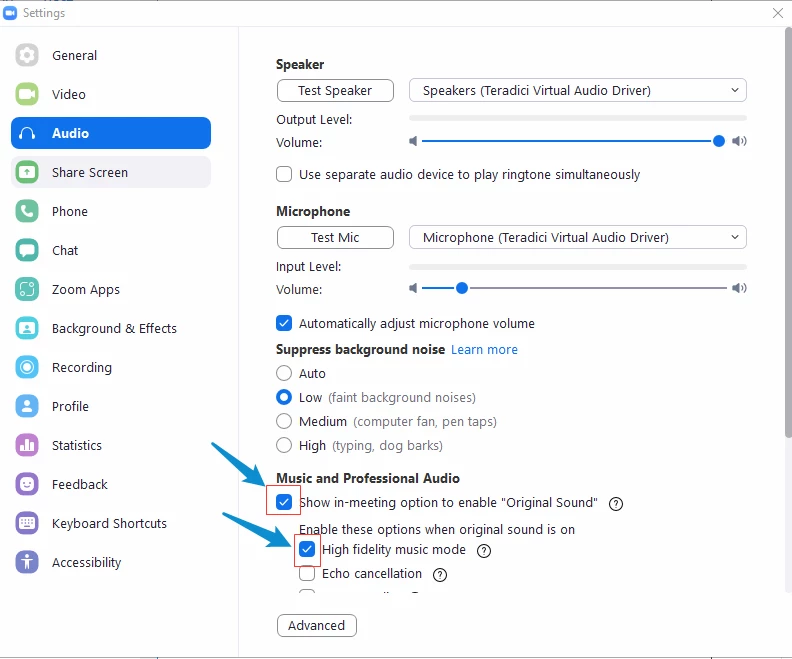
    Also, try to play around with your settings on your Zoom desktop application > Settings > Audio > but what I suggest is to enable Music And Professional Audio > Show in-Meeting Meeting option to enable "Original Sound" and enable the "High fidelity Music Mode". 

    You might also consider closing any other applications on your device that are not needed.

    But if it's really that important to you, you can also consider reaching out to Zoom customer support through chat or email because they can check what happened in your previous meetings be it a device issue or an internet issue and such things.

    5 replies

    JepZoomieAnswer
    Employee
    May 1, 2022

    You should also check your internet connection if it's stable. If you are using some kind of VPN or Proxy, you can try turning it off.

    Also, try to play around with your settings on your Zoom desktop application > Settings > Audio > but what I suggest is to enable Music And Professional Audio > Show in-Meeting Meeting option to enable "Original Sound" and enable the "High fidelity Music Mode". 

    You might also consider closing any other applications on your device that are not needed.

    But if it's really that important to you, you can also consider reaching out to Zoom customer support through chat or email because they can check what happened in your previous meetings be it a device issue or an internet issue and such things.

    Newcomer
    April 10, 2023

    Zoom has such a lousy backup service!


    Employee
    May 12, 2022

    Hi, I just wanted to check in and see if my response has been of help to you. If so, it will be greatly appreciated if you can click the 'Accept as Solution' button.

    This will be a great help to the community and to people who are having the same concern and are looking for answers.

    Newcomer
    April 10, 2023

    Unfortunatel;uy not helpful! I have been running my Zoom classes for past 2 years with no issue. Zoom has made changes and now I have this problem fopr past 2 weeks!


    Newcomer
    November 22, 2022

    dilipsevak

    Newcomer
    August 8, 2023

    I am having the same issue teaching fitness classes on Zoom. The music was fine using the original sound for musicians "on " for 2 months and then Zoom had an update on June 27, 2023 and the next day the sound started cutting in and out. I have updated my audio drivers, I have reinstalled Zoom and got rid of temporary files, I have tried everything and Zoom support will not respond to my ticket. If anyone knows how to fix this, please let me know.

    Newcomer
    October 14, 2023

    I used the original sound for my fitness classes for the last several years.  I am having the same issue, it no longer works....  Where do we go to get this issue solved?