Multi Track Setting missing in Recording Settings
Hello,
I want local recordings to use multi tracks but when I go to the "Recording" "Settings" there is not an option to select.
Help is appreciated. Thanks

Hello,
I want local recordings to use multi tracks but when I go to the "Recording" "Settings" there is not an option to select.
Help is appreciated. Thanks
Hi @rksjames
Are you looking for separate audio tracks for each participant when recording locally?
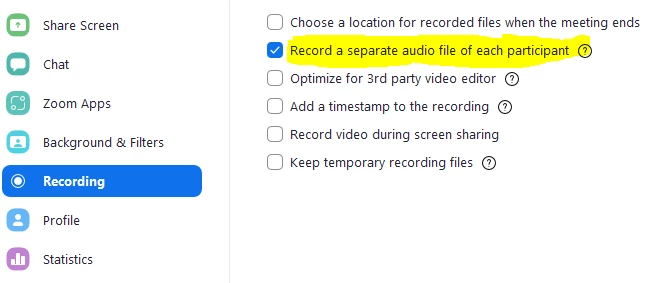
This should be in the Recording tab of your desktop Zoom app - see below.
Please note local recording does not provide isolated video recordings of each participant.
Also the separate audio tracks are only available in the desktop client - not mobile or web.
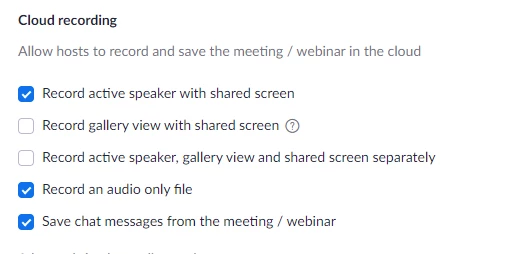
If you are Cloud recording, you have more options for video (but still not each participant) - but in the Cloud you cannot record separate audio tracks. https://zoom.us/profile/setting?tab=recording See second screen shot.
What version desktop client do you have?


Enter your E-mail address. We'll send you an e-mail with instructions to reset your password.