

memory usage high - displayed red | Community
Skip to main content
Newcomer
April 22, 2023
Question

memory usage high - displayed red

  • April 22, 2023
  • 9 replies
  • 75 views

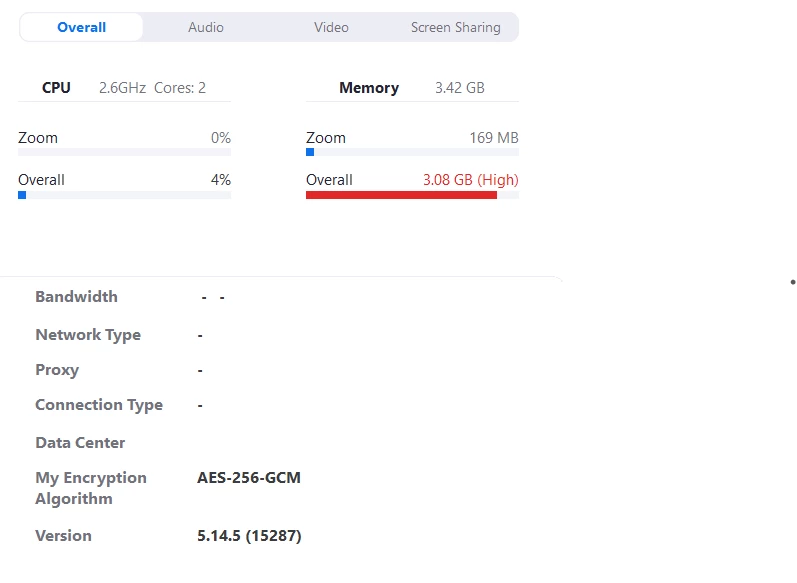
I cannot host meetings, participants cannot get to my room. I can stat a meeting though.  I notice that the memory use is very high - I have checked on my laptop and phone - so it seems it relates to ZOOM and not my devices.  

I have uninstalled and re-installed several times.  I've now upgraded thinking that would solve it.  I have checked my device, ran scans and memory checks - all OK.  

I'm completely lost.  Please help - and in everyday language as much as possible please.  Thanking you in anticipation. 
 

    9 replies

    Newcomer
    May 15, 2023

    I'm running into the same issue.  Memory usage is 3GB by the WebView2:Zoom Calendar process.

    junefloAuthor
    Newcomer
    May 16, 2023

    Hi Ross. I've checked other posts and still can't find any help. It seems memory is high if you record meetings, save them, etc. I don't. If you do it might be an idea to check and clear stuff out. Beyond that I'm lost. my biggest problem now is they have stopped link to China - in eastern area.  I only found this out by raising a ticket - you could try that, they are very helpful. 

    Good luck. 

    Newcomer
    May 16, 2023

    Thank you for the reply.  I haven't been recording but I do Owosso save captions. I'll contact their support. 

    Newcomer
    July 21, 2023

    The issue you're seeing on your 4 GB machine is due to the 3 GB used by the processes Ross Comer mentioned. I can't test it since I no longer have access to a Win 11 machine, but Zoom support suggested downgrading to version 5.15.0 using this link:

    https://zoom.us/client/5.15.0.17890/ZoomInstaller.exe?archType=x64


    I hope this helps.

    Newcomer
    July 21, 2023

    Well bummer. The link they sent doesn't work. Sorry.

    Newcomer
    August 18, 2023

    I've been working this issue with Zoom support since July. They seem incapable of duplicating it even though it appears on all the Win 11 machines and since 5.15.5 on all Win 10 machines.


    In essence, a machine with 4 GB RAM will probably choke if a browser is also open, and an 8 GB machine may slow down.


    The solution so far for a 4GB machine, is not to have a browser open during a Zoom session (might be able to run Firefox with few tabs), then after the session exit Zoom, go to Task Manager and kill the still active Zoom processes.


    Hope this helps.

    Newcomer
    August 18, 2023

    I'm not sure if you knew, Jimi, but in the latest editions of Zoom, Zoom is running if not one, but two, three, or more browsers in your background:


    More info:


    Zoom decided to go to a cheaper alternative instead of using Native Apps.

    Community Champion | Customer
    August 18, 2023

    Hello,


    No offence intended, but a computer with only 4 GB of RAM is not going to run very well with many applications considering your operating system also needs RAM to run.


    Regards

    Newcomer
    August 18, 2023

    No offense intended, but as someone working in the IT sector for the last 17 years who have built apps, I can tell you that adding too many WebViews in every new Zoom release instead of using fully native apps is causing many of these issues. How do I know about WebViews? Excellent question, in the Task Manager, you can easily find the Zoom Windows Edition, the Microsoft WebView 2 running. Why is it running? Does it have any intention? I'm just having a call, but sometimes I can see two, three, or more instances of the WebView 2 running there. Only if you use Zoom without logging into your account, then the app runs smoother since the WebViews are not loaded by default.


    I have a Surface 4 Laptop with 8 GiB of RAM and was forced to disable all unnecessary Zoom services from my account to allow smoother calls. However, the calls still consume a lot of energy. And no, I don't use the browser or other apps during my Zoom calls since I focus on the people who I'm talking to. Furthermore, I have disabled several Windows services to improve my Windows 11 experience, but only during the Zoom calls, my Surface goes nuts, not even when I'm coding in Visual Studio 2022, which should be raised a few eyebrows since this makes no sense. Visual Studio is an IDE for building apps, it must consume more energy, CPU, RAM, etc. than Zoom.


    Building non-native apps or hybrid apps and replacing them with WebViews (because it's cheaper) is always going to be less efficient. This is well-known in the software development world. Why is it less efficient? Someone else complained about using a Browser while you were having a Zoom call, voilà, using a WebView is exactly the same. Whenever you use Zoom with your account, you are also using a Browser (or Browsers) running in the background, without your knowledge, in any of the latest editions.


    Here is proof of the culprit in action:


    More info about the issue I raised before:

    https://community.zoom.com/t5/Meetings/How-to-disable-WebView2-services/td-p/126566


    Community Champion | Customer
    August 18, 2023

    Hi,

    Interesting point. Thanks for taking the time to elaborate.


    I still would advise against buying a computer with 4 GB of RAM to a friend or family member for any purpose.


    Regards

    Newcomer
    February 9, 2025

    Did u pick the Community Champ Name urself for the giggles?

    Because what part of Community don't advise people to learn. How to Help fight The Digital Divide?

    I wouldn't be ADVISING anything if I thought like the COMMUNITY CHAMP.


    Newcomer
    August 20, 2023

    I'm also not in favor of low-RAM PCs, but let's take some considerations. If Zoom can run in Chromebooks that often have 4 GiB of RAM, they rarely ever have more, and Zoom has a PWA:

    https://play.google.com/store/apps/details?id=us.zoom.pwa.twa


    Then, it means there are greater issues behind this like using WebViews for everything instead of native APIs and some Windows interfaces to connect with them. Of course, it's cheaper to use WebViews, but because it's cheap, it also causes all these issues.


    I own a Microsoft Laptop with 8 GiB of RAM and have often experience memory issues during my Zoom calls. Something it didn't happen in the past. But suddenly, I noticed how my fan started to get crazy during my calls. I had to disable several Zoom services and other stuff to optimize my calls. So, would you advise buying a new laptop with 16 GiB the next time or one with 32 GiB? It's hard to believe it since I can code and compile complex apps with 8 GiB, but I cannot have a video call.


    What is the worst part of WebViews? It's not that they are bad by themselves, it's that they are triggered in your background without you ever opening the Zoom Calendar, email, etc. This is poorly programmed. You have several browsers running in the background without your knowledge.


    Newcomer
    September 27, 2023

    I’m not happy that after I close Zoom, the web view service's are still running. 

    Newcomer
    September 29, 2023

    No one likes it.

    Newcomer
    December 10, 2024

    Has anyone found a solution to this issue? Nothing like factory resetting your brand new Razer laptop, 3 times, before discovering the problem has been ZOOM all along............🙃