Macbook Air HD Camera Backgrounds | Community
Skip to main content
Newcomer
January 6, 2025
Solved

Macbook Air HD Camera Backgrounds

  • January 6, 2025
  • 4 replies
  • 9 views

I have a macbook Air running Sonoma 14.6.1. The Facetime HD camera at the top of the screen when running a meeting has three settings under it: Portrait, Studio Light and Reactions. Other people I know have an addtional setting BACKGROUND which has virtual backgrounds that are seemless unlike the standard zoom backgrounds. Does anyone know why I do not have that option or where I could go to get it? Is it the operating system or the zoom? or a setting I missed?  Thanks

Best answer by bstrelko

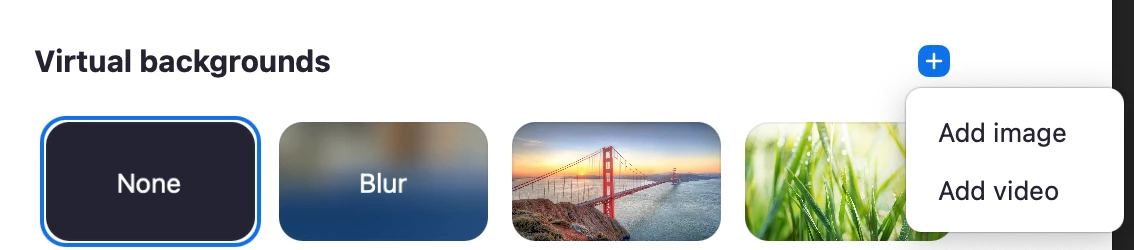
In the Zoom Workplace application, navigate to Settings -> Backgrounds and Effects.

You'll be able to select a background or manually upload one (shown in the screenshot below).


The settings you're referencing are MacOS-specific settings, not Zoom's, so you won't have access to standard Zoom backgrounds when going through the menu you've described.

Why the difference in quality? MacOS and Zoom use different algorithms for background replacement - Mac's is performed prior to the camera feed entering the Zoom application, while Zoom's is performed once the camera feed enters the application. Zoom's background replacement algo is processing a pre-rendered video downstream (universal to video from any of thousands of cameras that could be used), while Mac's is more aware of the nuances of one piece of hardware (FaceTimeHD Camera) that it needs to worry about. Two completely different animals.

4 replies

bstrelko
Community Champion | Customer
bstrelkoAnswer
Community Champion | Customer
January 6, 2025

In the Zoom Workplace application, navigate to Settings -> Backgrounds and Effects.

You'll be able to select a background or manually upload one (shown in the screenshot below).


The settings you're referencing are MacOS-specific settings, not Zoom's, so you won't have access to standard Zoom backgrounds when going through the menu you've described.

Why the difference in quality? MacOS and Zoom use different algorithms for background replacement - Mac's is performed prior to the camera feed entering the Zoom application, while Zoom's is performed once the camera feed enters the application. Zoom's background replacement algo is processing a pre-rendered video downstream (universal to video from any of thousands of cameras that could be used), while Mac's is more aware of the nuances of one piece of hardware (FaceTimeHD Camera) that it needs to worry about. Two completely different animals.

Newcomer
February 27, 2025

I am unable to get just my regular background. This is what's happening

I can add a virtual background, but not my real-life background.

Newcomer
September 23, 2025

Appreciate this technical detail, bstrelko.  I am finding the Macbook HD camera backgrounds are intermittently avaiable in the Zoom app, even as they are fully available in Facetime.  There seems to be some conflict with Zoom, or maybe a setting I can't find?

Newcomer
November 21, 2025

I have same problem as PB25. I just want my camera to use by house's background. HOW can I do this?