Mac support for calendar integration | Community
Skip to main content
Newcomer
December 22, 2022
Solved

Mac support for calendar integration

  • December 22, 2022
  • 13 replies
  • 180 views

Does anyone know if its possible to use iCalendar/Mac Calendar with Zoom to schedule/show meetings?  We have the desktop app but our email is not hosted by Outlook or Google.  It appears that Zoom only supports Exchange and Google for these integrations.  

Anyone at Zoom reading this - will there ever be  Apple support for mail/calendar? 

    Best answer by YaBoiB

    Hi @Derek5


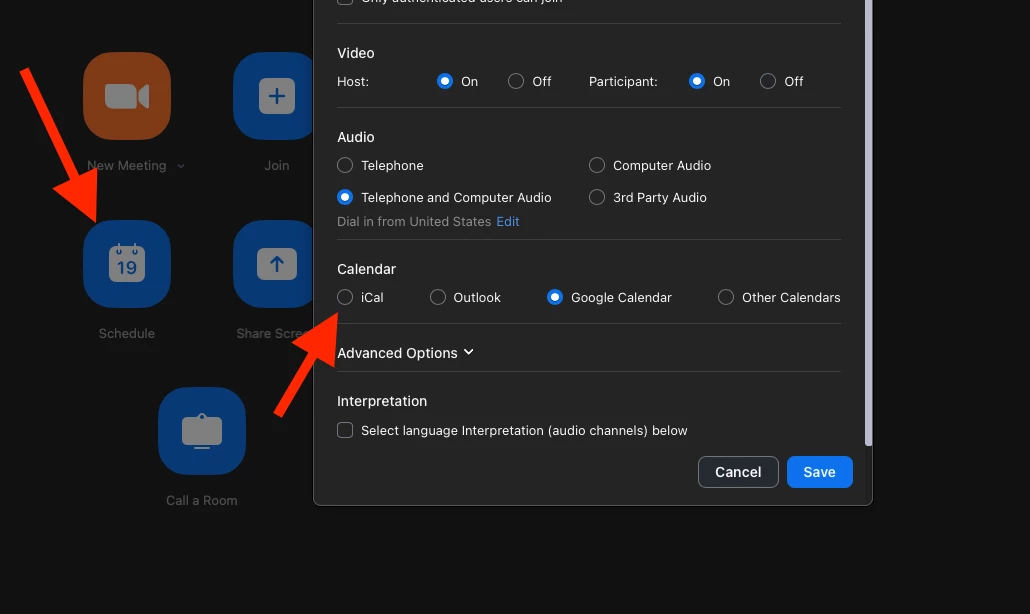
     The solution that I am speaking of is not in the web version of the Zoom client. It is on the app version on a PC or Mac. If you go to the home tab and then click on the blue schedule button you will see an option to schedule your meeting using iCal. 


     I hope that this is helpful. Let me know if there is anything further that I can do to assist you. 


    Brandon

    13 replies

    Newcomer
    April 26, 2025

    I am using Zoom Workplace 6.4.6 (the current version today). In the past, I used the "External Calendar" feature, which -when I selected 'ical'- would automatically create the respective calendar entry on my Apple Calendar. Now "External Calendar" is not available anymore. And similarly I have not found a way to download an .ics file locally.

    Am I missing something?

    Newcomer
    May 23, 2025

    Choose "other calendars" then choose "open" after creation and it will prompt to save to your Mac Calendar'

    Newcomer
    June 4, 2025

    So, here is what I do.

    First, I tell people to use calendly.com to schedule meetings with me. But many don’t want to do that. So, …

    When I create a zoom calendar entry, I invite myself, using my default email address. When I receive that email from my default account, I can click on the invitation, and add it to my default calendar (I use iCloud.com by default). Next, by opening that newly added calendar invitation from my calendar, I can use that invitation to invite other people.

    It all seems to work out, and it’s totally under my control, so I don’t need to rely on Zoom for calendar integration.

    MGSR
    Community Manager
    Community Manager
    June 6, 2025

    Hello community members, 

    We do apologize for the inconvenience and appreciate your patience.

    While the “iCal” option is still visible in the Zoom macOS desktop app, we want to clarify that this feature has never been fully supported by Zoom. Although it may have worked for some users in the past, recent updates to Zoom and macOS have introduced inconsistencies with its functionality.

    Because of this, our backend team is actively working on developing a fully supported integration to ensure a more reliable and seamless experience moving forward. We’ll be sure to share more details as soon as we have updates available.

    In the meantime, we recommend using one of our fully supported calendar integrations—Google Calendar, Office 365, or Exchange—for the most consistent performance.

    Thanks again for your understanding and for choosing Zoom.

    Newcomer
    October 27, 2025

    Is there any update to this?