Lower ALL Hands | Community
Skip to main content
Newcomer
January 19, 2024
Solved

Lower ALL Hands

  • January 19, 2024
  • 6 replies
  • 36 views

There used to be a feature where the meeting Host could lower all participants hands and it disappeared recently.


We use it a lot for Voting after the Host has counted all the Votes (Hands) he can lower them for the next round.


But it has gone and we can not find it anywhere, where has it gone please

Best answer by Eliot

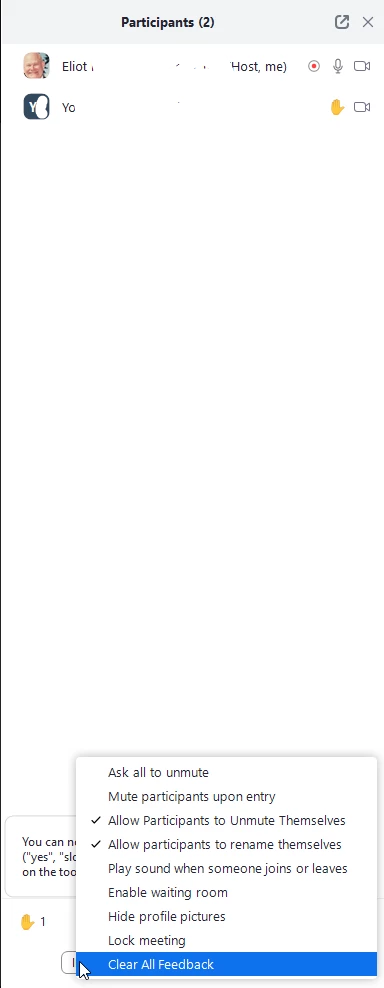
when you as host have meeting with participants that have raised their hands or other reactions, you can click participants.  on the Participants Screen, click the ellipsis (...) a bottom right and then select Clear All Feedback. you only see this option if there is Feedback.


Did my response answer your question? If so, please don't forget to mark the reply as an accepted solution.


thanks,  eliot


6 replies

Newcomer
February 4, 2024

Yes, its missing, very frustrating,.  Does anyone know where it went or why it went away? 

Community Super Champion | Partner
February 4, 2024

hi pwiles1968,


you can use Clear All Feedback to lower all participants hands.  on windows client meeting screen as host, click Participants, on the Participants Screen, click the ellipsis (...) and then select Clear All Feedback.  you only see this option if there is Feedback.

Did my response answer your question? If so, please don't forget to mark the reply as an accepted solution.


thanks,  eliot

Newcomer
February 13, 2024

That option is not on my menu in Meetings?  How else can it be done?


Newcomer
February 13, 2024

My menu ends with Lock Meeting

Newcomer
April 29, 2024

Has anyone found a solution to this? The "Clear All Feedback" suggestion is not an option on my computer/account. We are having an annual meeting of at least 80 members who will be voting on bylaws and other organizational issues. It used to be easy to lower all hands and move to the next item of business. Where has this gone (and why)? Please help. I run Zoom on a Mac. Thanks!

EliotAnswer
Community Super Champion | Partner
April 30, 2024

when you as host have meeting with participants that have raised their hands or other reactions, you can click participants.  on the Participants Screen, click the ellipsis (...) a bottom right and then select Clear All Feedback. you only see this option if there is Feedback.


Did my response answer your question? If so, please don't forget to mark the reply as an accepted solution.


thanks,  eliot


Newcomer
March 15, 2025

It is not visible  - Zoom is updated


New Member
January 28, 2026

Thank you so much to clear the doubts that lower all hands is now replaced by clear all feedback. I really search in google and chatgpt more than 30 mintues but now I got solution for Zoom community.