
Newcomer
Jul 1, 2023 11:26 AM UTC
Question

Local recordings inaccessible and not converting

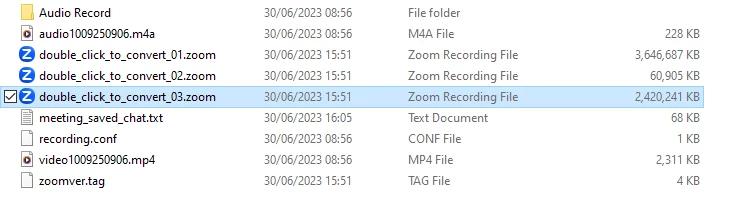
I ran a full day event yesterday and recorded to my external hard drive. The files SEEM to be there, but say "double click to convert to zoom". Double clicking is doing nothing.

Any advice?
 

3 replies

Community Champion | Customer
Jul 1, 2023 2:52 PM UTC

Hello,


  1. Sign in to the Zoom desktop client.
  2. Click the Meetings tab.
  3. Click the Recorded tab.
  4. Select the meeting topic with the local recording.
  5. Click Convert.

 
If that fails please follow the steps below;
 

  1. Create a new folder to your Documents or Download Folder and named it "Zoom" or anything you want.
  2. Once you are done creating a new folder on your Documents or Download folder, copy the  files "double_click_to_convert_01 & double_click_to_convert_02" and so on to the newly created folder.
  3. Double-click the larger file.


https://support.zoom.us/hc/en-us/articles/201362753-Troubleshooting-local-recording-issues 


Regards

If my reply helped, don't forget to click the accept as solution button!


Translate
Newcomer
Jul 14, 2023 6:02 PM UTC

thank you! I have tried for over a week to solve this problem and you just saved my day! Thank you!

Translate
Community Champion | Customer
Jul 14, 2023 6:29 PM UTC

Happy to help.

If my reply helped, don't forget to click the accept as solution button!

Translate
