language interpretations | Community
Skip to main content
Newcomer
October 4, 2021
Solved

language interpretations

  • October 4, 2021
  • 5 replies
  • 1 view

Hi

I have the Pro plan on zoom and want to enable interpretations.

I have the interpreters but just want to enable the feature on my zoom account but the setting is not available to enable or disable,

what should I do?
Is my license eligible?

if not what should i

    Best answer by Rupert

    Hi @JohnAdams 


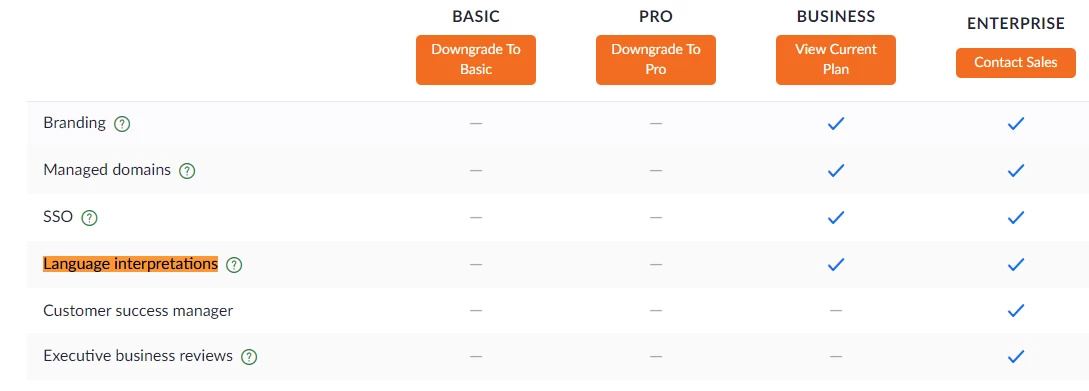
    Language interpretations is only available on Business accounts and above.


    5 replies

    Rupert
    Community Champion | Customer
    RupertAnswer
    Community Champion | Customer
    October 4, 2021

    Hi @JohnAdams 


    Language interpretations is only available on Business accounts and above.


    JohnAdamsAuthor
    Newcomer
    October 4, 2021

    Thanks a lot!


    Bort
    Employee
    Employee
    October 4, 2021

    @Rupert @JohnAdams , that page is actually a bit misleading, as you just need a Pro account with the webinar add-on to get Language interpretation enabled

    SULASIMOES
    Newcomer
    Newcomer
    February 7, 2023

    URGENT!  In the news version, Zoom allowed the interpreter to move the language panel not to block view.  But after positioning the desired location, HOW TO PIN THE PANEL DOWN in order NOT TO jump around when you switch speaking to languages??? I am an interpreter and LOST my job, because I was chasing the bar and not changing the channels in real time.  PLEASE HELP!!!

    SULASIMOES
    Newcomer
    Newcomer
    February 7, 2023

    URGENT!  In the new version, Zoom allowed the interpreter to move the language panel not to block view.  But after positioning the desired location, HOW TO PIN THE PANEL DOWN in order NOT TO jump around when you switch speaking to languages??? I am an interpreter and LOST my job, because I was chasing the bar and not changing the channels in real time.  PLEASE HELP!!!

    SULASIMOES
    Newcomer
    Newcomer
    February 7, 2023

    Meetings and Webinars: URGENT ATTENTION NEEDED!

    I am a Portuguese/English interpreting.  Zoom updated the language panel for it to be displaced to a desired position without blocking participants' info.  The issue is that now, the language panel or bar JUMPS AROUND when we switch languages! You can't pin it down!  It highlights in blue and it never goes back to a fixed position.  PLEASE GO BACK TO WHAT IT WAS, because we are losing jobs because of this "enhancement" or just tell us how to pin it down.


    SULASIMOES
    Newcomer
    Newcomer
    February 7, 2023

    Meetings and Webinars: URGENT ATTENTION NEEDED!

    I am a Portuguese/English interpreter.  Zoom updated the language panel for it to be displaced to a desired position without blocking participants' info.  Thank you for that.  However, the issue is now that the language panel or bar JUMPS AROUND when we switch languages or "speaking to"channels! You can't pin it down!  It highlights in blue and it never goes back to a fixed position.  PLEASE GO BACK TO WHAT IT WAS before or tell us how to make it stay in one place, because this "enhancement" has caused me to lose a very important assignment!  HELP, PLEASE!!!